


Pega flags this with a severe warning for a reason.
Using the write now parameter on Obj Save, or calling the commit method explicitly in your activity, is one of those habits that causes real production problems.
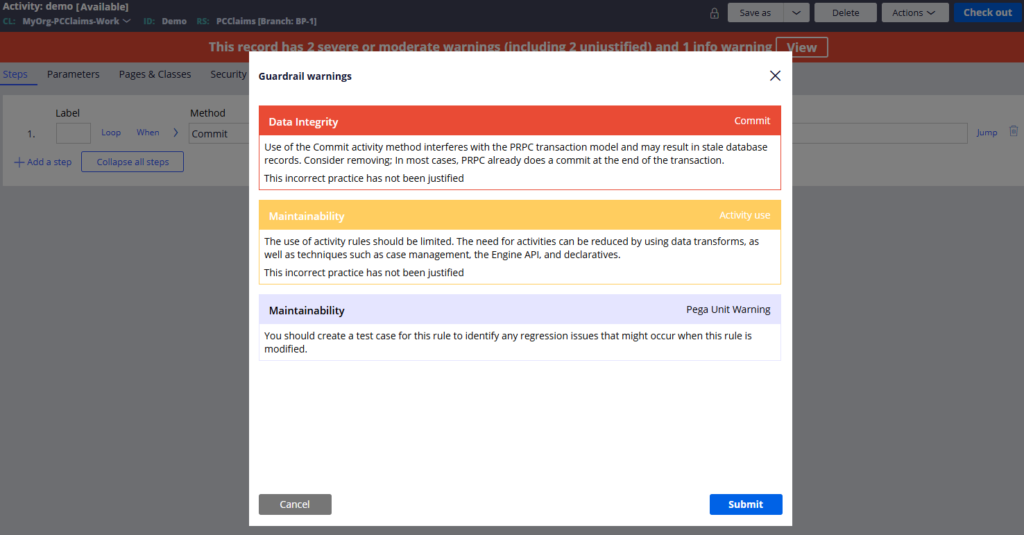
Here is why it matters and what to do instead.
The Core Problem – Data Integrity
Think of a payment transfer. Money is withdrawn from your account and deposited into someone else’s. These are two separate operations but one single business transaction. If the withdrawal commits successfully but the deposit fails halfway through, you have lost the money. The transaction is broken and there is no way to recover it cleanly.
The same principle applies in Pega. When you work within a case flow – submitting an assignment, creating a case, completing an action – multiple things happen in one go. Data properties update, queue instances are created, work objects are saved. All of these should be treated as a single transaction. If one part fails, nothing should commit.
That is what deferred save is for.
How Deferred Save Works
When you use Obj Save without the write now flag, Pega does not commit to the database immediately. Instead, it adds an entry to a deferred save list on the requester. Every Obj Save and Obj Delete without write now goes into this list.
When Pega reaches its natural commit point – finish assignment, case creation, case resolution – it commits everything in the deferred list in a single database transaction. One transaction, one point of failure, clean rollback if anything goes wrong.
The moment you use write now or commit explicitly, you are pulling that operation out of the single transaction and committing it independently. If anything fails after that point, the committed data stays committed. There is no rollback.
Where Pega Commits Automatically
Within case processing, Pega handles commits in several places automatically. When a case is created. When an assignment is completed via finish assignment. When a case is updated, resolved or reopened.
For each of these, Pega uses the Commit with Error Handling activity internally. This not only commits the deferred saves but also handles rollback if something goes wrong. This is the right pattern. If you ever need an explicit commit outside of normal case processing – in a background agent for example – use Commit with Error Handling, not a bare commit method.
What Goes Wrong When You Ignore This
A concrete example. An activity saves a fraud watchlist record using Obj Save with write now, then queues a background job to notify an external system. The write now commits the fraud record immediately. If something then fails in the queue operation, the fraud record is already in the database but the notification never fires. The transaction is split. The data is inconsistent. There is no way back.
That is a production incident waiting to happen.
The Simple Rule
Within case processing, never use write now or explicit commit. Pega’s engine commits at the right time automatically. Trust it. If you find yourself wanting to commit early, that is usually a signal that something in the design needs revisiting.
Watch the Full Walkthrough
In the video below I demonstrate the problem live – using write now in an activity, showing the fraud record commit to the database even when the overall transaction fails, and comparing it to the correct single-transaction approach where nothing commits if anything goes wrong.
This is one of those topics where seeing the failure in action is worth more than reading about it. The live demo makes the risk very clear.

