


App Studio often gets underestimated by technical developers.
Update – Remember App studio is going to be the place where constellation development can take place.
The assumption is – it is for business users, so why bother? But that thinking misses the point of what App Studio actually is and what Pega is trying to do with it.
Let me walk you through it.
Who Is App Studio For
App Studio is primarily built for citizen developers – which in Pega terms means business people who want to participate in application development without deep technical knowledge.
But developers can and should use it too. Especially in the early stages of building a new application, App Studio gives you a clean, user-friendly way to design cases, define data models and collaborate with business stakeholders.
Pega’s direction is clear – more and more development is moving into App Studio with every release. It is worth getting comfortable with it early.
What Is Different From Dev Studio
The first thing you notice when you switch from Dev Studio to App Studio is the missing Configure button.
That is intentional. The advanced configurations in Dev Studio are for technical developers only. App Studio keeps things clean and focused – case design, data management, channel configuration and user management. No more, no less.
The preview feature is worth mentioning here. You can check how your portal renders on desktop, tablet and mobile – all from within App Studio. Useful when you want to quickly validate a design without deploying anything.
Key Areas to Know
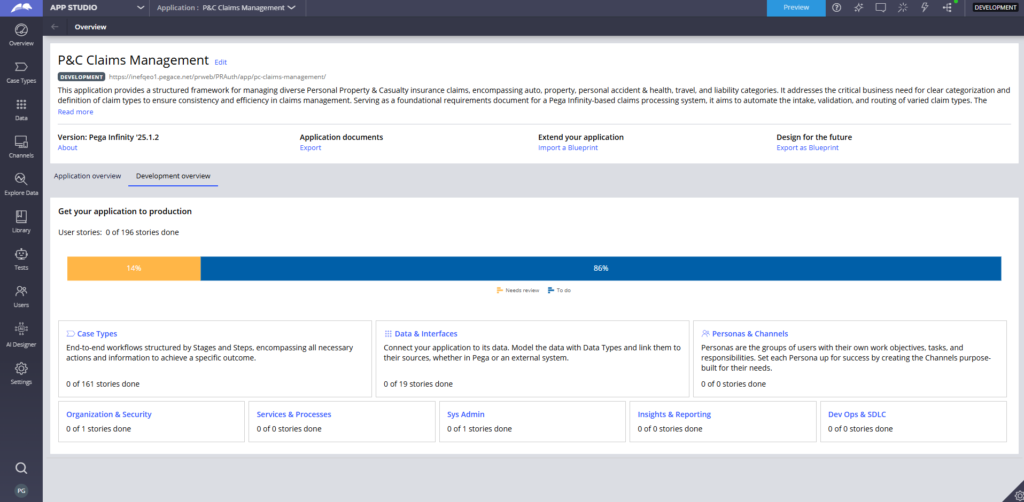
Settings – from here you can configure your application in a low-code way. Email accounts, branding, themes, application configuration settings. All in one place.
Users – manage who has access to your application and define how they authenticate. Simple and straightforward.
Channels – this is where you define how end users access your application. The most common is the web portal. But Pega also supports mobile, email, web mashup, digital messaging and even Alexa integration. All configured in a low-code way.
Data and Case Types – similar to Dev Studio but more user-friendly. From the data explorer you can define your data model, set up integrations and map the integration model to your application data. Case design lets you build the case lifecycle using a visual designer.
Branch Development Preferences – you can control where your code changes get saved. Either into a specific branch or let the system decide automatically. More on branches and rule sets in a later post.
Watch the Full Walkthrough
I walk through every section of App Studio live in the video below – including switching between studios, preview mode and the collaboration features in action.
Disclaimer – the video was created in Pega 8.7 version and the app studio changed drastically in the latest versions. Use the video to get a high level understanding!

