


Before you start building your first application in Pega, there is something more fundamental to understand.
The system instance.
It is one of those things that gets skipped in tutorials but matters a lot in real projects – especially when you are setting up a new environment or moving from one infrastructure to another.
What Is a System Instance
Think of a system instance as the identity of your Pega environment. Every environment you have – development, QA, staging, production – can be mapped to its own system name in Pega.
For example, for a client called Alife you might have Alife_Dev, Alife_QA, Alife_Staging and Alife_Production. Each one is a separate system instance, and each one holds system-wide configurations that apply to all applications running on that server.
When you do a fresh Pega installation, two system names come out of the box – Pega and PRPC. One of them is your default. In a greenfield implementation, creating your own system instance is typically one of the first things you do.
Key Configurations in a System Instance
There are four main settings worth knowing.
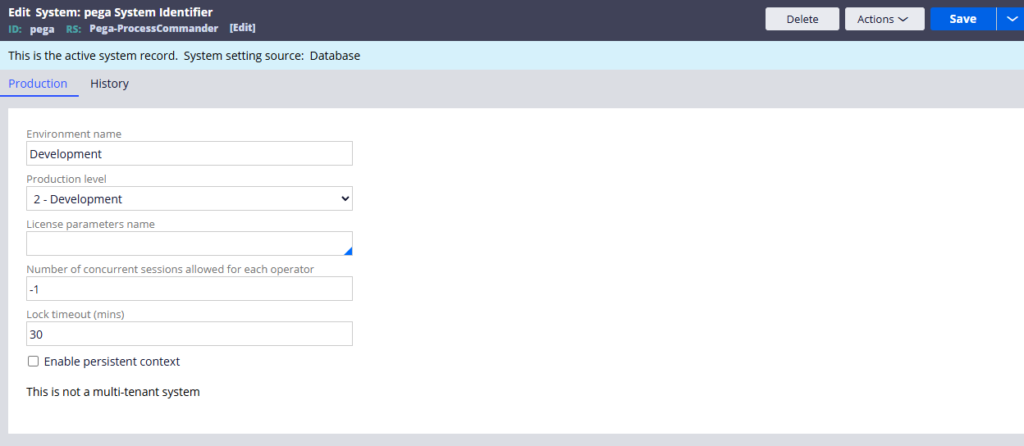
The first is production level. Pega uses a scale from one to five – sandbox, development, QA, staging and production. This value is not just a label. It affects how certain engine behaviours work. For example, flow rules in draft mode will not execute when the production level is set to five. A lot of out-of-the-box Pega logic checks this value, so always make sure it is set correctly for each environment.
The second is environment name. This is auto-populated based on the production level but you can override it. If your project calls QA something different – like SIT or system integration testing – you can update the name to match.
The third is concurrent sessions. Set to minus one by default, which allows unlimited sessions per operator. If you have a security requirement to restrict operators to a single session, this is where you configure it. Just be careful – if an operator does not log out properly, a restricted session count can cause access issues.
The fourth is lock timeout. When a user acquires a lock on a case and then goes idle, this setting controls how long before the lock softens and becomes available to others. The default is thirty minutes. After that time passes, another user can take over the case. You can also configure lock timeout at the case level if you need more granular control.
Changing Your System Name
Changing the system name is something you do rarely – usually only during fresh setup or a major infrastructure migration like moving from on-premises to cloud.
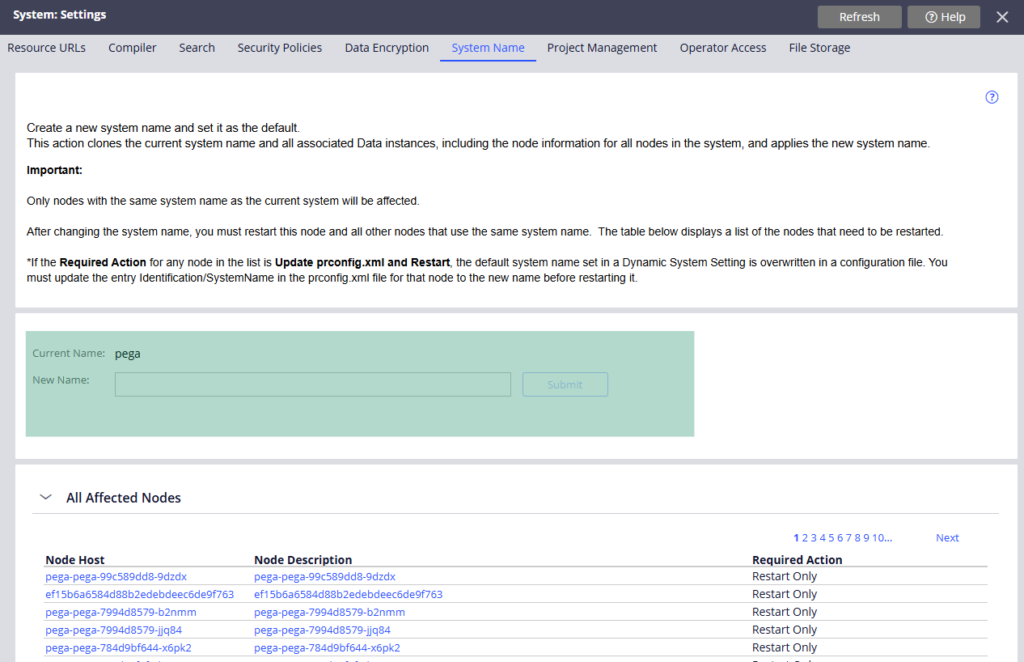
When you change the system name, Pega automatically creates new requester types for the new system and updates the dynamic system settings. But one thing you must not forget – after changing the system name you need to restart all nodes in the cluster for the change to take effect.
Watch the Full Walkthrough
In the video below I walk through creating a new system instance from scratch, configuring all four settings, and changing the default system name with a live server restart to confirm the changes.
System instances are a foundational part of any Pega setup. Getting them right from the start saves confusion later when you are trying to understand why certain behaviours differ across environments.

