

From Pega Infinity onwards, queue processor is the recommended replacement for standard agents. If you are still using standard agents for background processing, this is worth understanding.
How Queue Processor Differs From Standard Agent
The main difference is in how data is stored and processed. Standard agents use database tables for everything. Queue processors use Kafka topics and partitions as the primary processing mechanism – which is significantly faster and supports multithreading.
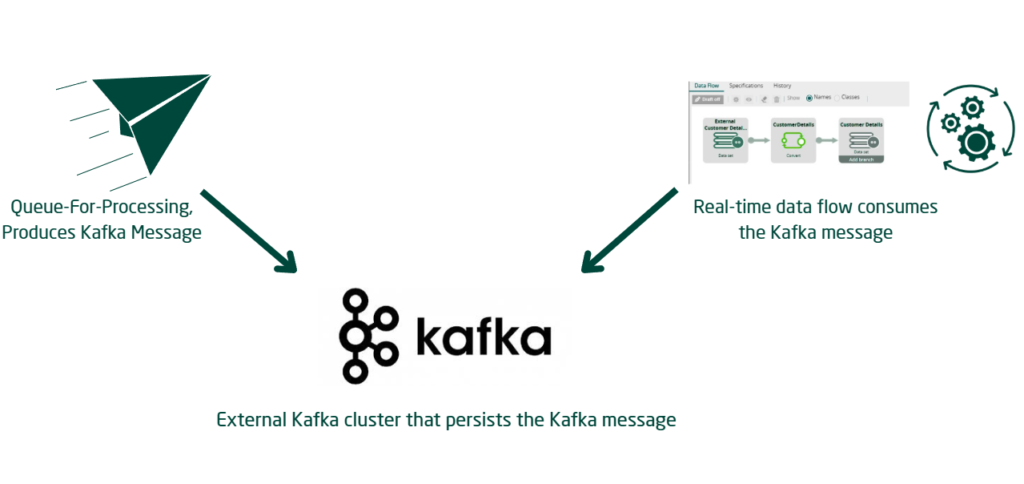
That said, queue processors still use database tables in two situations. Delayed items – when you want processing to happen at a future time – get saved to a dedicated database table first, then published to Kafka when the time comes. And broken items – failed processing – also get persisted to a dedicated table for retry handling.
Queue processors are also dependent on the stream node. If the stream service is down, incoming messages fall back to the delayed item table rather than being published to Kafka. Standard agents have no such dependency.
Standard vs Dedicated Queue Processor
There are two types worth knowing.
A standard queue processor uses a shared out-of-the-box Kafka topic – pzStandardProcessor. You do not create your own queue processor instance. Just specify the activity you want to run. Good for lower volume processing or one-off bulk updates during off-peak hours.
A dedicated queue processor creates its own Kafka topic and partitions. You create the queue processor rule, assign an activity, configure threading and error handling, and it gets its own isolated processing pipeline. Recommended for high-volume or business-critical processing where shared topic contention could cause issues.
Key Configuration Points
When creating a dedicated queue processor, the main settings are whether processing is immediate or delayed, the number of threads per node – capped by the number of Kafka partitions – and the processing activity.
For error handling, you can configure maximum retry attempts, initial delay between retries and a delay factor that progressively increases the wait time between attempts. Alert thresholds for long-running processes can also be set here.
One thing to note – queue processors use the access group of the user who queues the instance, similar to standard agents. You can override this with an alternate access group if needed.
Migrating From Standard Agent
If your standard agent processes only real-time messages with no future-scheduled entries, migration is straightforward. Create the queue processor, replace queue-for-agent calls with queue-for-processing, then disable the agent.
If the agent has delayed entries still pending in the queue, wait for those to process before disabling the agent. Disabling it prematurely means those entries never get processed.
Watch the Full Walkthrough
In the video below I walk through the full queue processor setup – creating a dedicated queue processor, queuing instances from both activity methods and flow shapes, testing immediate and delayed processing, and debugging from Admin Studio.
Queue processor is one of those topics that rewards the time you invest in understanding it. Once you see it processing Kafka messages in real time compared to a standard agent, the performance difference speaks for itself.

