


The way we design applications in Pega has evolved significantly over the years. If you are learning Pega today through Academy, product documentation, or project exposure, it is easy to feel overwhelmed by the number of terms used to describe application structure.
You may hear about implementation applications, enterprise applications, component applications, components, application specialization, and now, more recently, modular design with business modules, integration modules, utility modules, and innovation layers. At first glance, these terms can feel overlapping, inconsistent, and unnecessarily confusing.
In this article, I want to simplify these concepts and explain how they relate to each other, so you can build a practical mental model of application design in Pega.
A Brief History of Application Design in Pega
To understand the terminology, it helps to understand how the architecture evolved.
There are other blog articles on this topic can be found here – Situational layer cake
1. The monolithic reusable design: before Pega 7.2
In older Pega versions, application design commonly followed a framework-and-implementation pattern.
A typical setup looked like this:
- A framework application contained reusable assets
- An implementation application extended the framework and delivered the business-specific solution
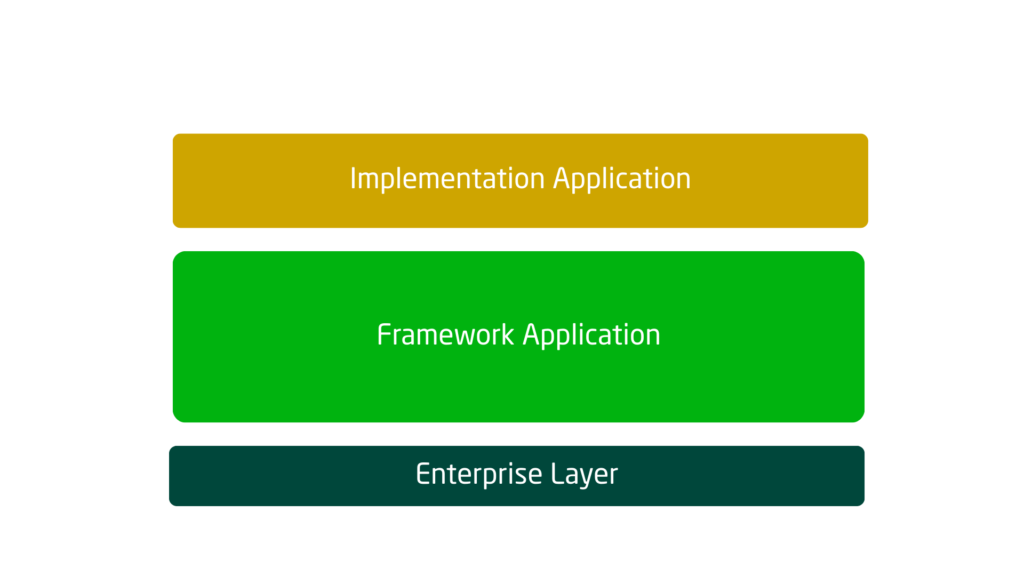
At that time, an application could have only one built-on application. This naturally encouraged teams to create large framework applications that acted as the base for implementation layers.
This pattern was widely used, but for someone starting with modern Pega today, it is better to view this as historical context rather than the recommended design approach.
2. The move toward a more service-oriented architecture: from Pega 7.2 onward
Starting around Pega 7.2, the platform began moving away from the rigid framework model toward a more flexible and modular application structure.
Two major shifts happened
- Applications could now have multiple built-on applications
- The traditional idea of always creating a framework application started to lose relevance
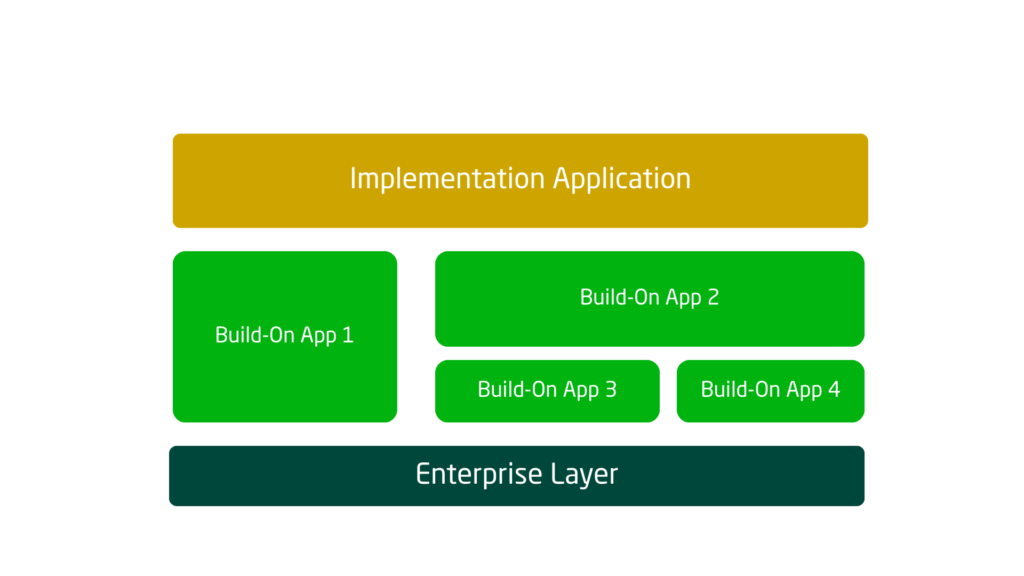
This was an important architectural change. Teams no longer had to create a framework application by default. Instead, reusable capabilities could be organized in a more targeted way, and even implementation applications could act as reusable built-on applications for other solutions.
I still remember that during the Pega 7.4 era during my LSA App build exams, one strong architectural recommendation was: do not create a framework application unless there is a real need for it. That was a major shift, because many teams had previously created framework applications almost by habit.
Over time, even Pega’s own terminology evolved. The word “framework application” became less common in newer documentation, although many experienced architects still use it in conversation.
3. Further evolution: component rulesets, components, and component applications
The term component is not new in Pega. It existed even in much older versions, including Pega 5 and Pega 6.
Earlier, there were ideas such as:
- component rulesets
- shared rulesets
A component ruleset was intended to store reusable logic that could be used across applications.
Over time, this evolved into a more formal concept through the Component rule type. Today, you can create a component (which is a collection of rulesets) as an individual rule kind of.
Or you can also create or treat an application as a component application or a reusable application
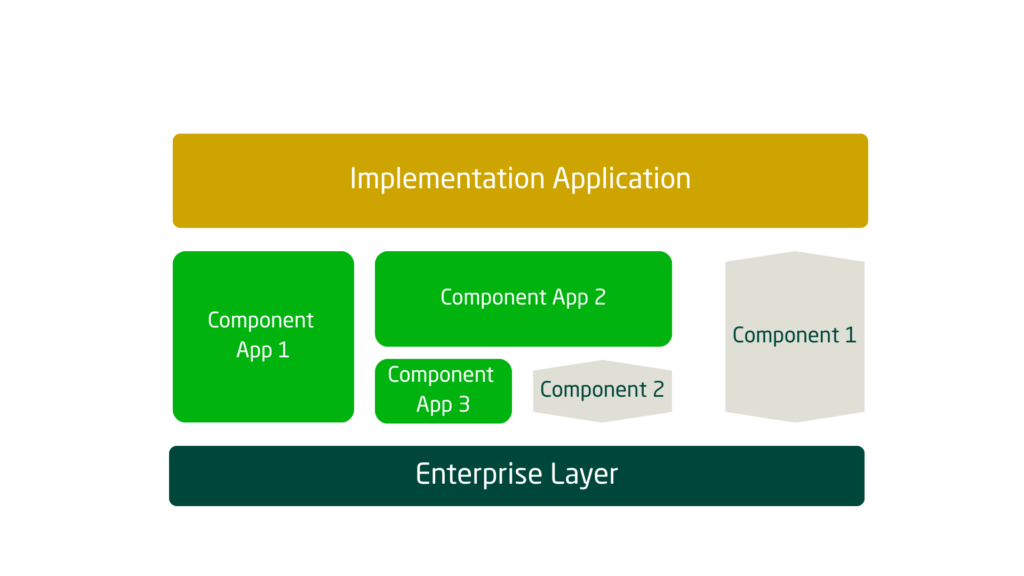
This is where the distinction between components and component applications became more visible. These two are related, but they are not exactly the same. We will come back to this with a business example shortly.
4. The modular application design era with Constellation
With modern Pega design, especially in the Constellation era, the architecture is increasingly described in terms of modules.
You will now hear about:
- business modules
- integration modules
- utility modules
- modular applications
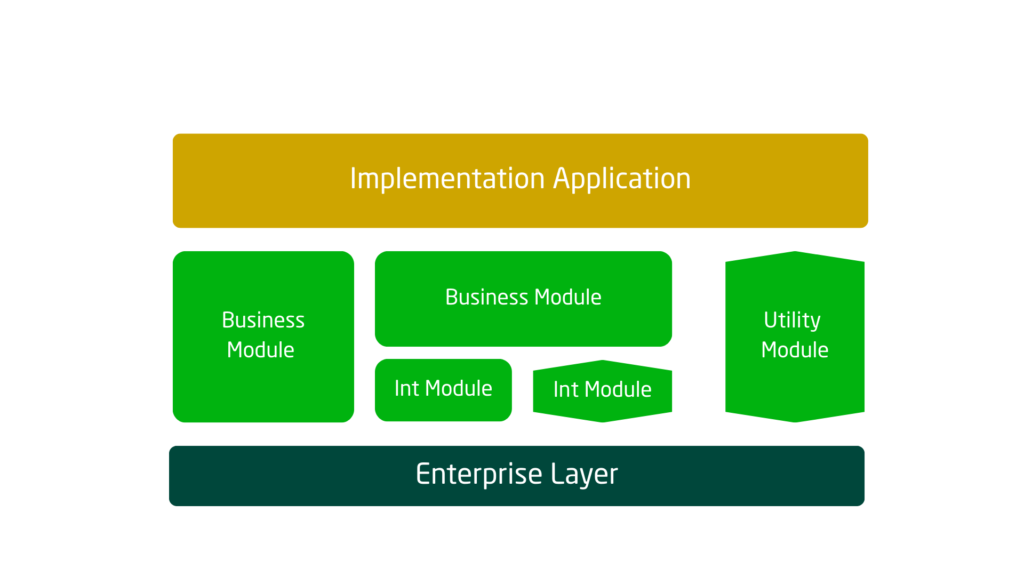
At a technical level, this can sound like something entirely new. But in practice, modules are not a completely separate invention. They are largely an evolution in how we describe and organize components and component applications in a more business-friendly and low-code-friendly way.
So before jumping into modular design terminology, it is important to first understand the technical building blocks underneath it.
Understanding the Core Application Types in Pega
Let us use a simple example: a Flight Claims Application.
Suppose you are building an application where users log in, submit claims, process requests, manage customer information, validate flight details, and send notifications.
A clean high-level design might include the following layers.
Enterprise application
The enterprise application is usually the starting point for application design in Pega.
This should remain lightweight and should contain only truly enterprise-wide reusable assets, such as:
- branding
- common UI themes
- shared organizational standards
- broad enterprise-level utilities or policies
The enterprise layer should not become a dumping ground for all reusable logic. Keep it clean and intentionally minimal.
Implementation application
The implementation application is the actual business application that end users interact with.
In our example, this would be the Flight Claims application.
This layer contains:
- case types
- user journeys
- business-specific flows
- portal configuration
- work processing logic
- application-specific rules
This is the final application that delivers business value directly to the user.
Component applications and components
Between the enterprise application and the implementation application, you can place reusable building blocks.
This is where component applications and components come in.
For the Flight Claims example, imagine the following reusable areas:
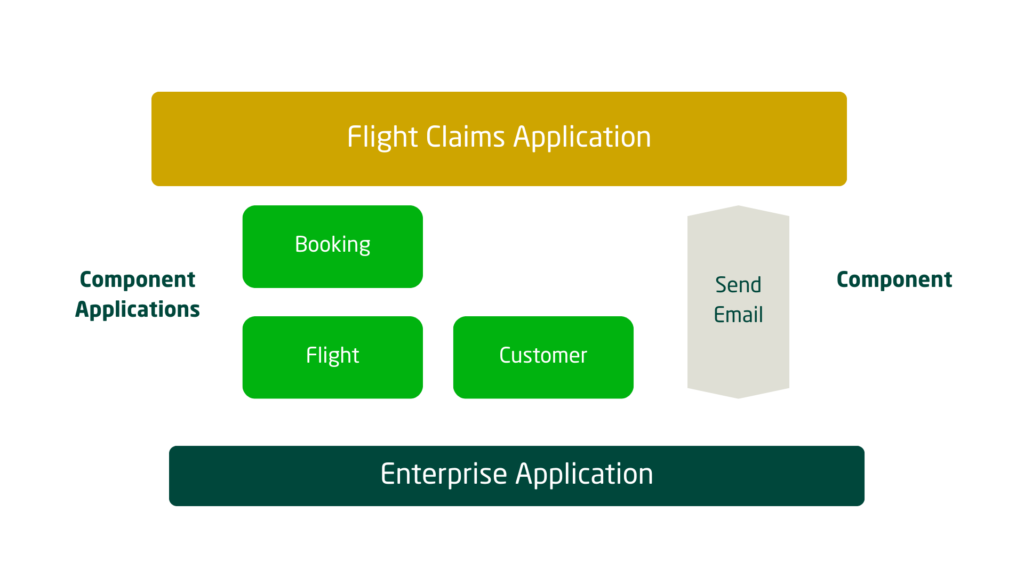
- Customer as a component application
- Flight as a component application
- Booking as a component application
- Send Email as a component
A layered structure could also exist among the component applications themselves. For example:
- the Booking component application may depend on the Flight component application
- the final Flight Claims implementation application can then build on these reusable pieces
This makes the implementation application focused and leaner, because the reusable capabilities are already separated and structured.
Component vs Component Application
This is where most of the confusion usually starts.
Let us make it practical.
What is a component application?
A component application is a reusable application layer that can contain one or more rulesets and can represent a broader functional capability.
In our example:
- Customer
- Flight
- Booking
These are good candidates for component applications.
Component application is simply an application rule in Pega, just like how you used to create any other application, you can simply create a new application as a component application.
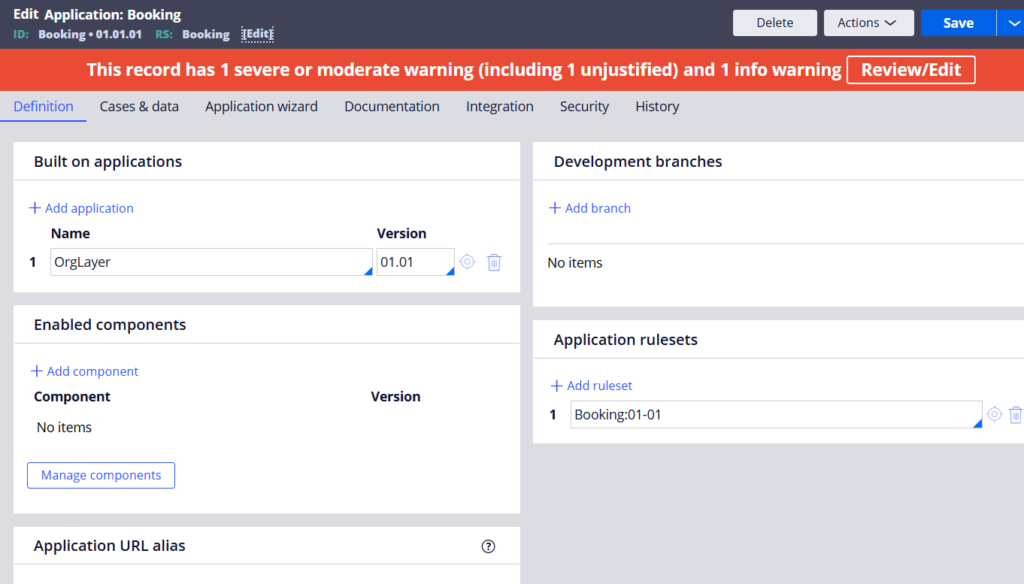
A component application rulesets can typically include different rules
- data model
- data pages
- integrations
- processes
- decision logic
- reusable UI assets
- business services related to a specific functional domain
Think of a component application as a reusable functional package.
What is a component?
A component is usually smaller and more utility-oriented.
In our example:
Send Email is a good candidate for a component.
Unlike component application, for creating components, you need to navigate to Configure -> Application -> Components
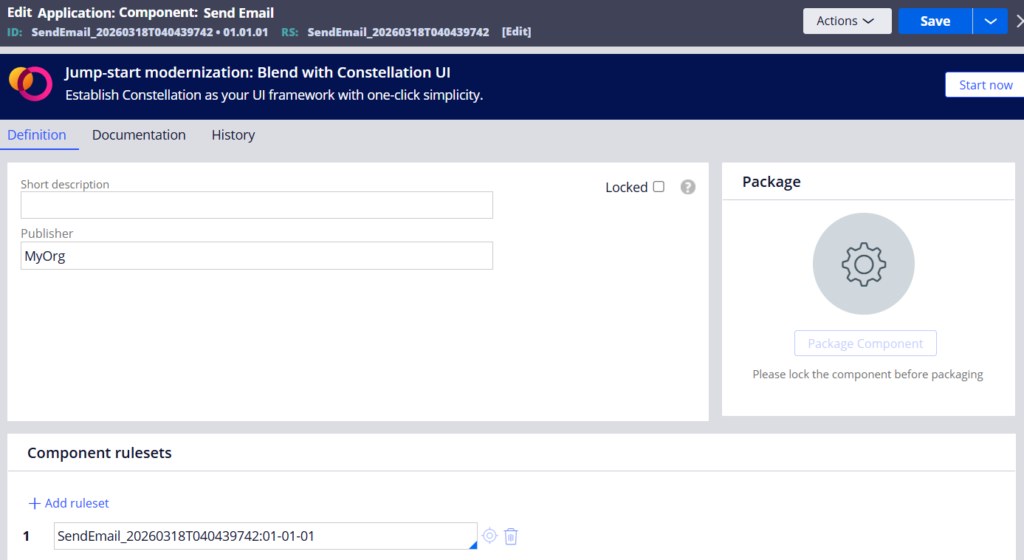
Technically Component is also a specialized Application rule form.
A component is often designed to perform a focused technical or reusable utility function. It may accept inputs, perform logic, and return outputs or trigger an action.
Examples could include:
- sending emails
- encryption utilities
- document generation helpers
- reusable validation utilities
- connector wrappers for a single technical capability
Think of a component as a focused reusable building block, often more technical and narrower in scope.
More about the component can be found in this YouTube video
Where the Boundary Gets Blurry
Now let me add a little more confusion, because in real projects the line is not always absolute.
For example, integrations can be designed either as:
- a component
- or a component application
Both approaches can be valid depending on the situation.
A single reusable integration utility might fit well as a component.
But if you are integrating with a major external system and need to group together:
- multiple related connectors
- data mappings
- error handling
- request/response transformations
- testing support
- reusable service abstractions
then a component application may make more sense.
This is why architects can argue both sides and still be technically correct.
The better way to decide is to use logical boundaries:
- Is this a small reusable capability?
- Or is this a larger reusable functional area?
- Does it need its own lifecycle and testing structure?
- Will other applications consume it as a package?
Those questions matter more than rigid labels.
How Modules Fit Into This Picture
Once you understand components and component applications, the newer idea of modules becomes much easier to grasp.
In modular application design, we often simplify the conversation and call these reusable units modules.
Examples include:
- business modules
- integration modules
- utility modules
From a technical perspective, what you create behind the scenes may still be a component or a component application. The word module is often used as a higher-level architectural term that is easier to communicate, especially in modern low-code and Constellation discussions.
So, in many cases:
- a utility module may map to a component
- a business or integration module may map to a component application
That is not a strict one-to-one rule, but it is a useful way to understand the relationship.
Do modules include case types?
Usually, no.
As a general best practice, case types belong in the implementation application layer, because that is where the end-to-end business journey is assembled.
Modules should typically contain reusable assets and reusable capabilities, not the final business case implementation itself.
That keeps your reusable layers clean and prevents them from becoming tightly coupled to one business application.
Applying This to the Flight Claims Example
If we reframe the same design using modular terminology, the picture becomes simpler.
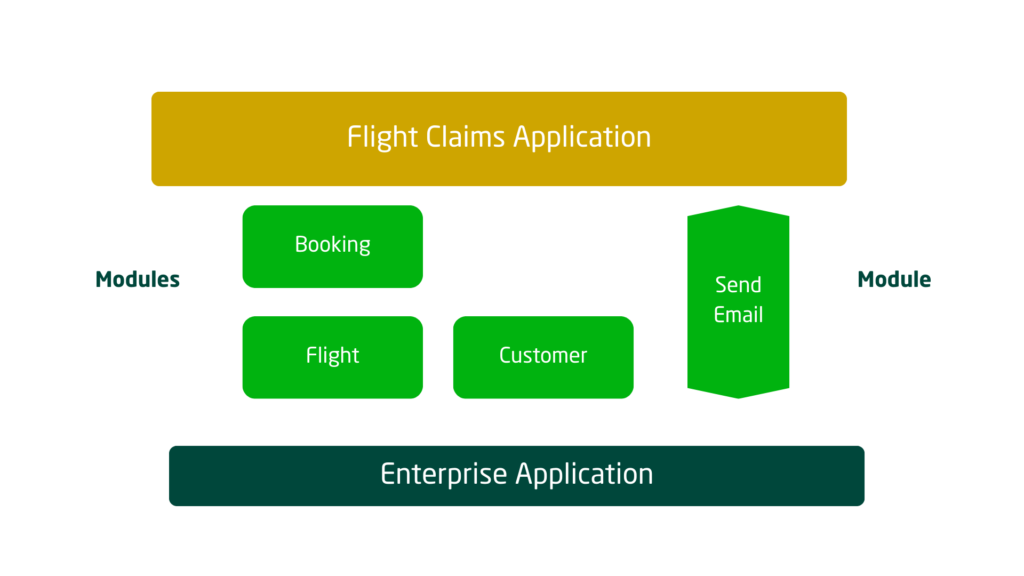
You might describe the reusable assets like this:
- Customer module
- Flight module
- Booking module
- Email utility module
- External airline integration module
The implementation application then assembles these modules into the full Flight Claims solution.
So although the terminology has evolved, the core principle remains the same:
separate reusable capabilities from business-specific implementation logic.
Practical Best Practices for Using Components and Modules
Here are a few practical recommendations.
1. Design them as self-contained layers
A component or module should be as self-sufficient as possible.
It should have clear interfaces, accept inputs, return outputs, and expose reusable behavior without tightly coupling itself to unrelated layers. This makes it easier to consume, test, and maintain.
2. Do not over-modularize everything
Not every small reusable rule deserves to become its own module or component.
Too much fragmentation creates maintenance overhead, more dependencies, and more governance complexity. Focus on identifying meaningful reusable capabilities, not every small shared rule.
3. Establish ownership through a central architecture or CoE team
Reusable modules need ownership.
A central CoE or architecture team should define:
- usage standards
- versioning strategy
- lifecycle management
- design expectations
- governance and reuse policies
Without ownership, reusable layers quickly become messy and inconsistent.
Final Thoughts
The terminology around Pega applications can absolutely feel confusing, especially because it reflects years of platform evolution.
What used to be called framework applications gave way to more flexible built-on application design. Then components and component applications became the preferred reusable building blocks. And now, with Constellation and modular design, we often talk about everything through the lens of modules.
The key is not to get stuck on the labels.
Instead, focus on the intent behind each layer:
- Enterprise application for lightweight enterprise-wide assets
- Implementation application for the final business solution
- Component applications for reusable functional capabilities
- Components for focused reusable utilities
- Modules as the broader modern way of organizing reusable assets
Once this foundation is clear, modular design patterns become much easier to understand and apply.
In the next article, I will go deeper into how these concepts are applied in Constellation-based application design and what good modularization looks like in practice.

