


Security in Pega is not just about configuring authentication or enabling a few platform settings.
For a Pega CoE team, the bigger responsibility is making sure that applications continue to stay secure over time. People leave the organization, roles change, new APIs are introduced, Mashups get exposed to the internet, custom components are added, and new security advisories keep coming in.
Based on my own experience working with Pega platforms, here are five application-level security areas that I believe every Pega CoE team should actively monitor.
This is not intended to be a complete Pega security checklist. There are, of course, many more controls at the infrastructure, cloud, network, database and platform layers. I am focusing on practical areas that can easily be overlooked at the application level.
5. Manage operators who leave the organization or change roles
Pega stores operator records in the pr_operators table.
In most enterprise applications, especially where SSO is enabled, authentication itself is usually well controlled. If an employee leaves the company, their Identity Provider account is disabled and they should no longer be able to authenticate into Pega.
But there is another side to this.
What happens when somebody changes departments, changes responsibilities, or no longer needs access to a particular Pega application?
The person may still have a perfectly valid corporate identity. In that case, authentication alone is not enough. Authorization becomes the important defense.
Your application should be able to evaluate the user’s roles, groups, attributes, or other information received from the Identity Provider and ensure that they still have the right level of access.
Another important point is that the Pega operator record and your external Identity Provider are not automatically synchronized in every setup.
If someone’s role changes in the Identity Provider, that does not necessarily mean the existing Pega operator record is immediately updated. Depending on your implementation, the latest information may only be reflected when the user authenticates again, unless you have provisioning or synchronization mechanisms such as SCIM in place.
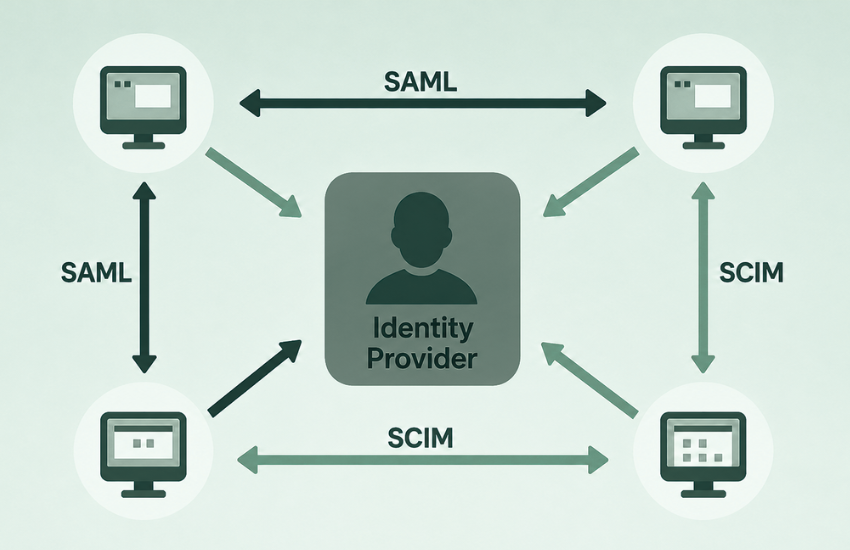
Pega has this SCIM capability OOTB from Infinity ’26 version!!
This is why operator inactivity and disablement policies are equally important.
A good security policy should automatically disable operators that have not been used for a defined period of time. This gives you another layer of protection instead of allowing hundreds or thousands of old operator records to remain active forever.
I still remember one situation in a previous environment where an ex-employee attempted to log in, and we identified the attempt through audit-log monitoring.
That is exactly why these controls matter.
And one more related point: if you have an internet-facing Pega application with a login page, assume that the login page will eventually be targeted.
Pay special attention to basic-authenticated operators, password policies, failed-login controls, inactive accounts and any login-page customizations that you introduce.
4. Pay special attention to Mashups, Web Embeds and custom UI
Pega Mashups and Web Embeds are extremely useful when you need to expose Pega flows or screens inside another customer-facing website.
But the moment you embed Pega functionality into an internet-facing application, the attack surface changes.
There are different authentication and integration patterns available for Mashups and Web Embeds, and I will not go into which approach is best in this article.
From a CoE perspective, however, I would strongly recommend one thing:
Make penetration testing mandatory for customer-facing embedded Pega experiences before production go-live.
Do not assume that because the underlying Pega application is secure, the embedded experience automatically inherits the same level of protection.
Test authentication flows, authorization boundaries, exposed parameters, session handling, browser interactions and any other potential entry points.
The same principle applies to Custom DX Components.
With Constellation adoption increasing, more organizations are creating their own custom UI components. Any custom frontend code should go through the same security review process as other custom application code.
Pega also provides several tools and capabilities that can help during these reviews, such as the Security Analyzer, access-control checks and other security assessment capabilities.
The important point for the CoE is to make these checks part of the delivery process, rather than something that happens only after a vulnerability is discovered.
3. Make the Pega Security Checklist part of your delivery process
Pega provides a comprehensive Security Checklist covering a wide range of security considerations for applications.
It is worth spending proper time on this before taking an application to production.
Some of the checks require manual verification, so this is not something that should simply be assigned to one developer at the end of the project.

I would treat the checklist as a shared responsibility.
The Pega CoE, application team, security team and relevant business stakeholders should collectively ensure that the required controls have been reviewed and that any deviations are understood and documented.
More importantly, do not treat the checklist as a one-time go-live activity.
Applications evolve.
New integrations are added. New authentication profiles appear. New service packages are created. Custom code gets introduced.
For critical applications, it is worth revisiting the security checklist periodically or as part of major releases.
2. Stay on top of Pega Security Advisories
This is one area where the CoE really needs to be proactive.
Pega regularly publishes security advisories for vulnerabilities or security-related platform updates. Pega so send these as CAD tickets in support portal.

Someone within the CoE should actively monitor the relevant Pega support channels and understand:
- What vulnerability is being addressed?
- Which Pega versions are affected?
- Are any of your environments impacted?
- Is there any client-side action required?
- Could there be an application impact after the remediation?
If you are running on Pega Cloud, many platform-level security fixes may be managed as part of the cloud service. One of the reasons to host your applications in Pega cloud 😉
But that does not mean the application team can completely ignore the advisory.
There may still be actions required from the client side, configuration considerations, testing requirements, or potential application impacts that you need to understand.
The key point is simple:
Do not just apply security fixes. Understand what is being fixed and whether it affects your applications.
1. Secure every API, authorize the caller and validate the data
This would be my number-one application-level security focus.
Pega applications are becoming increasingly API driven.
With Constellation and modern integration patterns, a significant amount of application functionality is exposed and consumed through APIs, even if the end users never directly see those APIs.
That makes authentication, authorization and input validation extremely important.

A CoE should periodically review all exposed APIs and answer some very basic questions:
How is this API authenticated? Who is allowed to call it? What data is being accepted? What validation happens before the data is processed?
Legacy APIs deserve particular attention.
You may be surprised by what still exists in lower environments: old services, legacy integrations or test endpoints using outdated authentication approaches. Occasionally you will even find interfaces that were created without the level of protection you would expect today.
The CoE should maintain visibility into the authentication mechanisms used across APIs and identify anything that needs to be modernized.
Also remember that authentication is only the first step.
Knowing who the caller is does not tell you what that caller should be allowed to see. That second question is where I see most application-level gaps today.
In traditional Pega UI you could get away with a lot. Hide a section, remove a control from the screen, and the problem looked solved. Constellation does not work that way. The client talks to the server directly, so anything the server is willing to return is reachable, whether or not it ever appears on a screen.
So authorization has to be enforced where the data is served, not where it is displayed. privileges and access control on the underlying rules and classes are doing the real work now. The API should return only what that specific user is entitled to.
For a CoE, this is a mindset change worth pushing into design reviews rather than test cycles.
Even a perfectly authenticated and authorized API can still become a security problem if it accepts and processes untrusted data without proper validation.
Secure the endpoint, authorize the caller and validate the payload.
Final thoughts
These are just five areas that I have seen becoming especially important from a Pega CoE and application-security perspective.
There are of course many more controls across Pega Platform: encryption, access groups, privileges, ABAC, rule security, secrets management, audit logging, data protection, infrastructure security and much more.
More often, issues appear because something slowly falls outside the team’s visibility:
An old operator stays active. A legacy API remains unnoticed. A Mashup goes live without enough testing. A security advisory is not reviewed properly. A checklist becomes a tick-box exercise.
That is where a strong CoE can make a real difference.
Security should not be something you review only before production.
It should be something the CoE continuously stays on top of.

