


Pega Blueprint, as we all know, can help organizations reimagine and modernize business processes.
If a legacy process is currently running on an older technology or platform, a few focused Blueprint sessions can help business and technology teams visualize a better future state and get a head start on the transformation journey.
But what if the application is already a heritage Pega application?
What if you have a Pega application that has been running for many years using the traditional UI architecture, and you now want to modernize it?
This is where the Pega Application Signature Tool becomes interesting.
In this article, let us take a practical walkthrough of the tool and understand how it can help us move from an existing heritage Pega application to a reimagined application using Pega Blueprint.
First, what does modernization mean?
When you look at modernization through a Solution Designer lens, the first question should not be:
How do we modernize this application?
The first question should be:
What exactly needs to be modernized?
A Solution Designer does not start with the solution. A Solution Designer starts with the problem and keeps asking why until the real cause shows up.
This is the core idea behind the “Ask Why” approach. Stakeholders rarely describe the structural problem. They describe a symptom, and they usually phrase it as a request for a solution.
Take a heritage application as an example. A stakeholder says the application looks old and needs Constellation. Ask why. Users find it slow and hard to work with. Why? They jump across many screens and re-enter the same data. Why? The process contains manual steps and workarounds that were added over the years. Why are they still there? Nobody has challenged the process since the day it went live.
A few questions later, this is no longer a UI problem. It is a process problem, and a new interface would never have fixed it.
That is the trap. It is easy to solve for how the application looks instead of how the work gets done.
Do not jump to the solution. Ask why until you reach the real problem.
Only after that you decide what needs to be modernized. let’s assume we identified the process problem.
The complete business process needs to be reimagined
The application may have been running for many years, and the business process itself may no longer represent the way the organization wants to work.
Over time, most heritage applications collect unnecessary manual steps, outdated case stages, and duplicate approvals. Technical workarounds introduced years ago stay in place long after the problem they solved has disappeared. Data objects that nobody uses anymore remain in the model. Meanwhile, automation and AI opportunities go untouched, and the customer or employee journey still follows the shape of the old system instead of the way people actually work.
In this situation, simply giving the old application a new user interface may not create enough value.
A new UI on top of an old process is a fresh coat of paint on the same problems. Users still click through the same unnecessary steps.
Reimagining is where the real value appears. When you challenge the process itself, you can remove steps that add no value, automate work that people do by hand, and bring AI into the places where it genuinely helps. The result is faster case resolution, less rework, and an application that is cheaper to maintain.
You are going to touch this application either way. Use that opportunity to fix the process, not just the screens.
The complete process needs to be understood, challenged, and reimagined.
What is the purpose of the Application Signature Tool?
The Pega Application Signature Tool is designed to support the discovery and modernization of heritage Pega applications.
It analyzes selected parts of an existing Pega application and generates a standardized file with the extension:
.pegasign
This file can then be uploaded to Pega Blueprint as a code analysis document.
Blueprint uses the information from the signature file to create a visual representation of the existing application. Once the current state is available inside Blueprint, teams can use the Reimagine capability to design a future-state process.
In simple terms:
- The Application Signature Tool helps you understand the existing Pega application.
- Pega Blueprint helps you reimagine what that application should become.
- The resulting Blueprint gives you a structured head start for implementation using the latest Pega capabilities.
So yes, you get both current-state discovery and future-state reimagination in one connected journey.
A kind of two-in-one modernization experience 😊
However, the tool does not make every modernization decision for you.
The Application Signature Tool gives Blueprint evidence. Architects and business stakeholders must still provide the judgment.
Preparing the heritage application
The Application Signature Tool is available as a free component from the Pega Marketplace.
Download the package that supports the Pega version on which your heritage application is running. Since the supported versions and packages may evolve, always verify the latest Marketplace description and installation documentation before getting started.
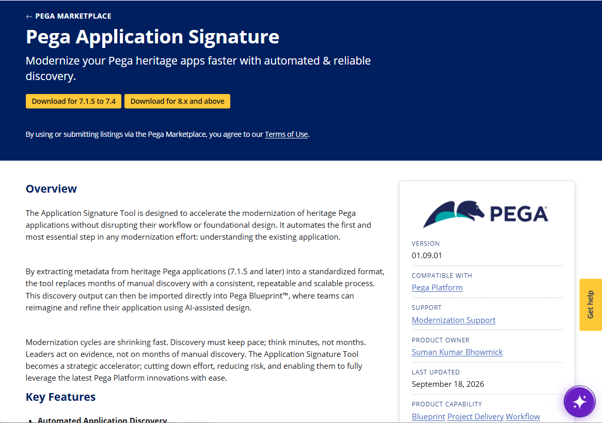
Once the component is imported, the high-level preparation involves adding the required ruleset to the target application and giving users access to the Application Signature Tool portal. You also configure the required access group and portal access, and verify that the application and case types are available for analysis.
The component provides a dedicated portal called the Application Signature Tool.
From this portal, you can review and select the case types and data objects that should be included within the modernization scope.
Let us assume that the component installation and portal configuration are complete.
The remaining journey involves two major steps.
Step 1: Create the PegaSIGN file
Launch the Application Signature Tool portal.
The portal analyzes the application and displays the eligible case types and data objects.
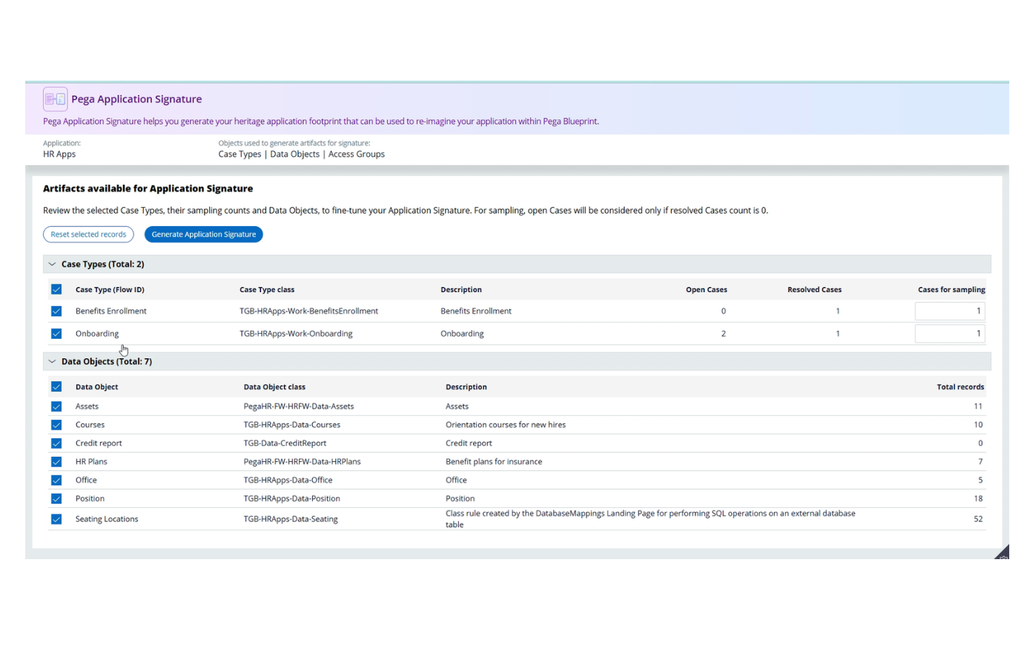
One important point to understand is that the tool focuses on non-Constellation case types.
The tool also uses resolved case information to identify case types that are actively used. Therefore, ensure that the required case types have suitable resolved-case data available in the environment. If a case type has no resolved case available, it might not appear as expected because the tool may consider it unused or created only for testing purposes.
Once the discovery process is complete, the portal displays the applicable case types and data objects.
You can then:
- Select the case types that should be included.
- Select the relevant data objects.
- Click Generate Application Signature.
- Review the generated summary.
- Download the resulting
.pegasignfile.
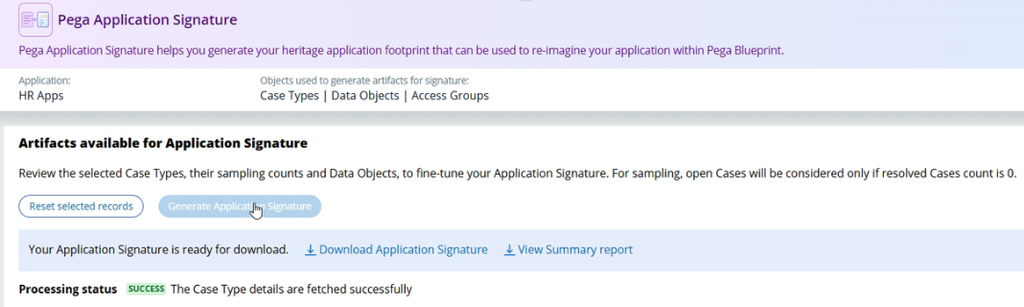
Before downloading the file, confirm that the selected scope represents the part of the application that you genuinely want to modernize.
You do not necessarily need to select everything.
For a large application, it may be better to begin with one business area or a group of related case types and approach the modernization incrementally.
Step 2: Reimagine the application using Pega Blueprint
After generating the .pegasign file, the next part of the journey happens inside Pega Blueprint.
This step can be divided into two activities:
- Visualizing the existing application
- Reimagining the future application
Visualize the existing application
Before reimagining the process, first bring the current application state into Blueprint.
Create a new Blueprint and navigate to the option for uploading supporting assets.
Upload the generated .pegasign file as a code analysis document.
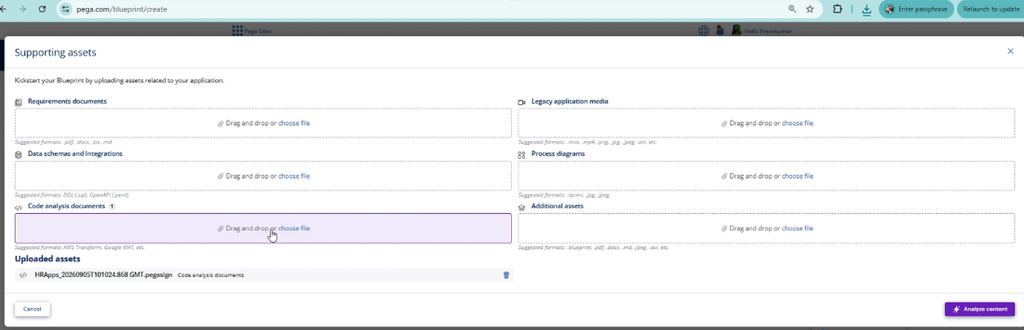
Blueprint analyzes the signature file and generates application assets based on the information extracted from the heritage application.
This can include the current case types, case stages, process steps, personas, data objects, and the relationships between the application elements.
You now have a visual starting point representing the existing application.
As you can see the below the comparison between the legacy case and the visualizaion from blueprint. Both looks the same!
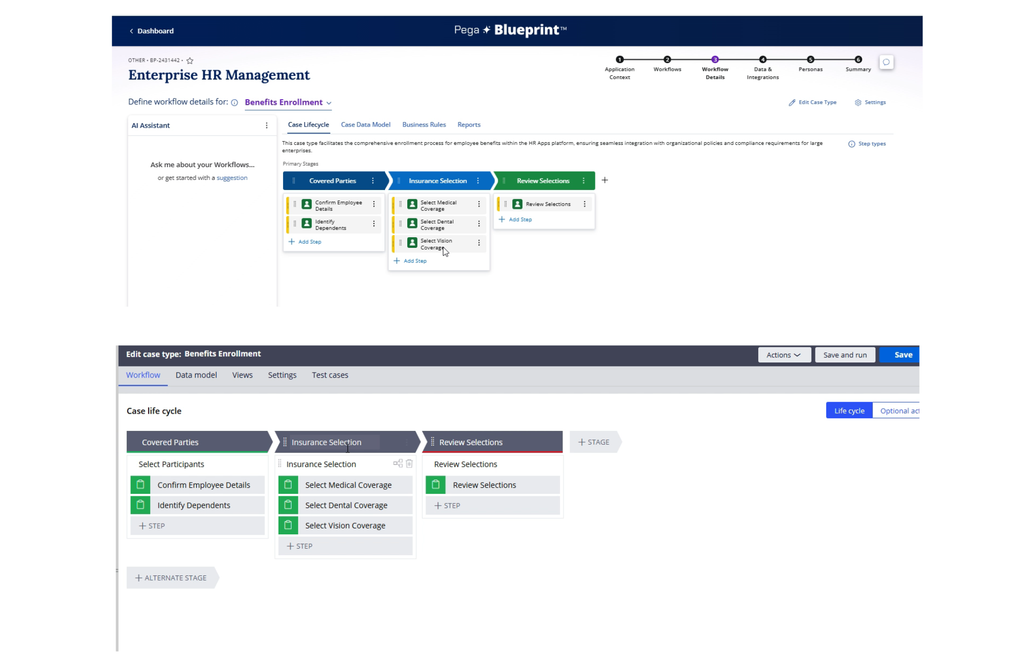
Still we are not reimaging, we just recreated it and that completes the first activity.
Reimagine the created Blueprint
Once the existing application has been visualized and validated, you are ready to reimagine it.
From the Blueprint dashboard, use the Reimagine option to redesign the process using Blueprint’s GenAI-assisted capabilities.
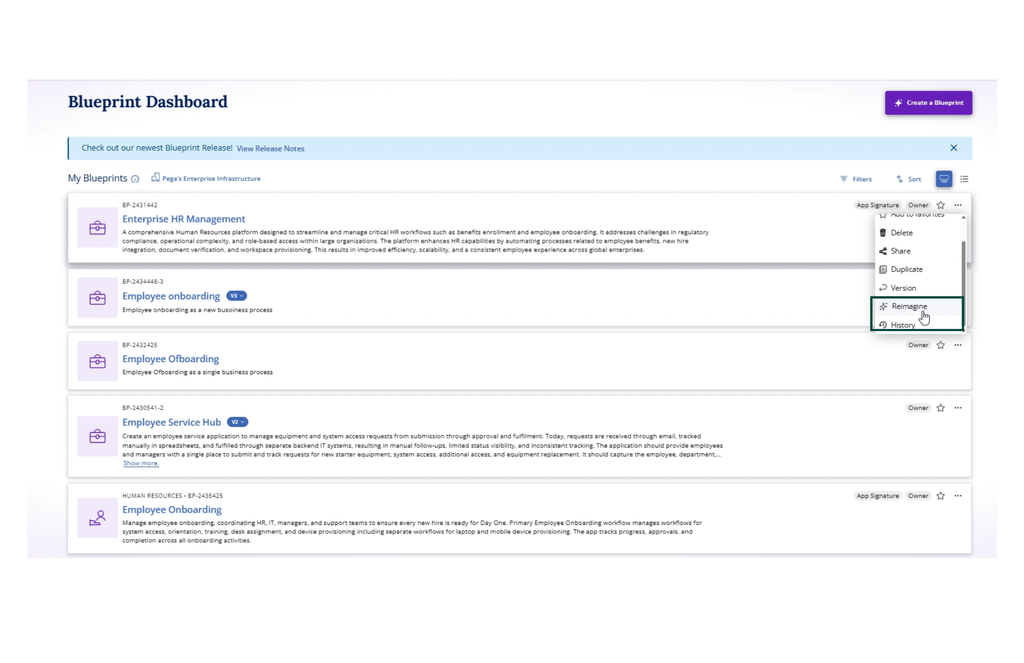
You can provide additional guidance covering areas such as current business problems, modernization objectives, unnecessary manual steps, new personas, compliance requirements, automation opportunities, and AI use cases.
You can also tell Blueprint which capabilities must remain unchanged and which existing integrations or data should be reused.
Blueprint can use this information to propose a reimagined business process.
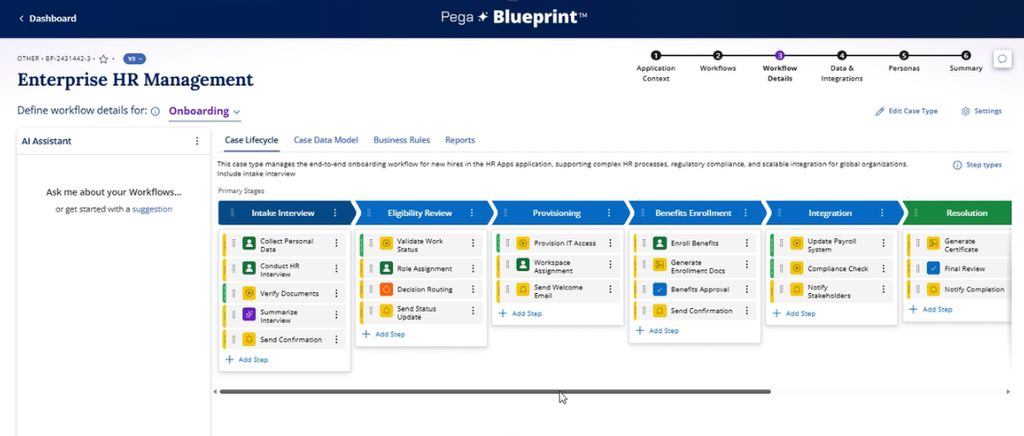
You can then review the generated stages and steps, challenge the proposed design, refine the case lifecycle, and continue developing the Blueprint through the normal Blueprint delivery journey.
This is where the real value appears.
You are not simply copying the existing application and adding a Constellation interface on top of it.
You are using evidence from the existing application to design a better future state.
Once the Blueprint is ready, it can be used as a structured head start for implementing the reimagined application in Pega Infinity.
Why is this valuable?
Modernizing a heritage application normally begins with discovery.
Teams interview business users, inspect rules, trace case journeys, review old documentation, analyze integrations, and try to understand why the application behaves in a particular way.
This effort is still important.
However, documentation may be outdated, and the people who originally designed the application may no longer be available.
The Application Signature Tool can accelerate the initial discovery by providing Blueprint with structured information extracted from the application.
This allows the modernization discussion to begin from a more evidence-based position.
Instead of looking only at technical rules, teams can review a visual case lifecycle and ask which parts of this process still deliver business value, and which steps exist only because of an old technical limitation.
They can ask where users perform unnecessary manual work, which data objects and integrations should be reused, and which capabilities can be retired. They can also ask where Constellation, automation, or AI can improve the experience.
That is much more valuable than treating modernization as a direct one-to-one rebuild.
A message for Pega CoEs and architects
This final message is for Pega CoE teams, LSAs, Solution Designers, and lead developers.
Take a fresh look at your Pega estate.
You may have a heritage application that has served the organization reliably for many years but is now waiting for its next chapter.
It may not need to be completely discarded.
It may need to be properly understood, thoughtfully challenged, and reimagined using the capabilities now available across the Application Signature Tool, Pega Blueprint, and Constellation.
Try the tool in a lab or controlled lower environment.
Generate the application signature, upload it to Blueprint, and see what conversations it creates with your business stakeholders.
Do not modernize a heritage application only because the technology looks old. Modernize it when you can create a better business outcome, and use the evidence to decide what deserves a new life.
Maybe it is time to give one of your heritage Pega applications a new life 😊

