


If you work on Pega infrastructure or have ever wondered how rolling restarts keep user sessions alive, session Quiescing is the mechanism behind it.
Why Quiescing Exists
When you bring a server down – whether for maintenance, restart or upgrade – any active user sessions on that server would normally be lost. Clipboard pages, thread context, in-flight work – all gone.
Quiescing solves that. Before the server shuts down, it passivates all active sessions to persistent storage (database or file system). The session data survives the server being taken offline. When the user’s next request hits a different node, that node activates the session from the persistent store and processing continues seamlessly.
Quiescing and passivation are tightly linked. Quiescing is essentially a controlled, deliberate passivation of all sessions before a planned server event.
How the Process Works
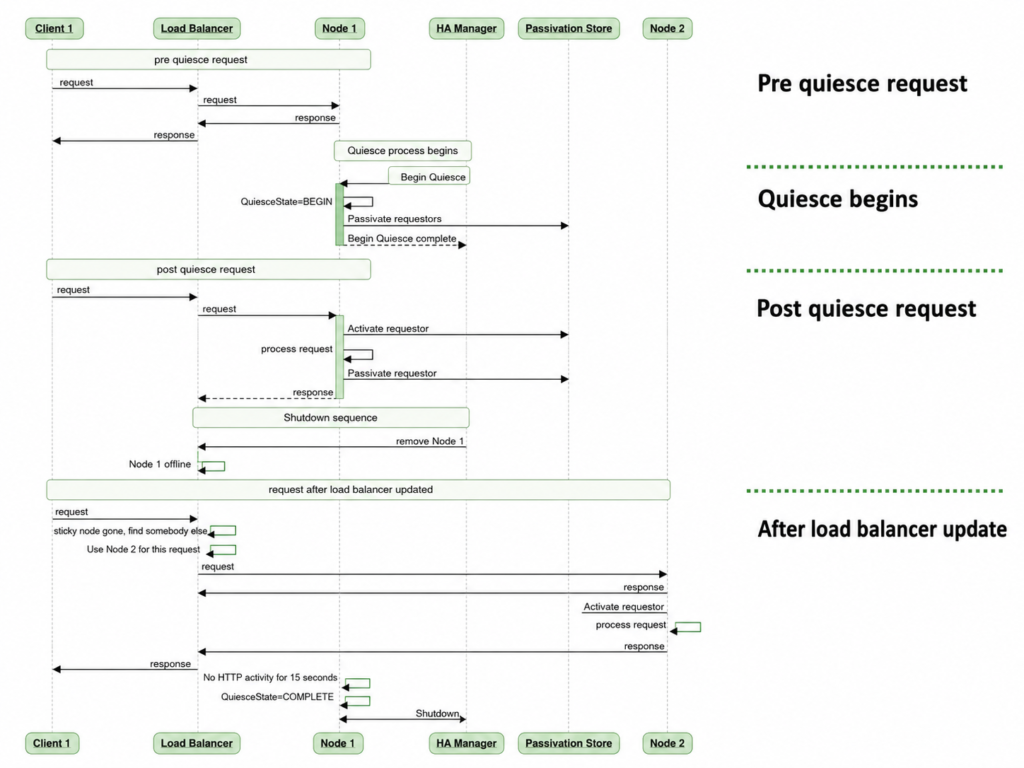
The participants in a Quiescing process are the client browser, the load balancer, the server nodes, the high availability manager and the passivation store.
When the HA manager triggers Quiescing on a node, the node enters a queued state and passivates all active sessions to the persistent store. At this point, new incoming requests are still routed to the queued node by the load balancer – because the node has not been removed yet. For each new request, the node activates the session from storage, processes the request, responds, then passivates again. Active, passivate, active, passivate – until the shutdown sequence runs.
Once the server shuts down and the load balancer marks the node offline, new requests go to remaining nodes. Those nodes activate the passivated sessions from the shared persistent store and continue serving the users. The session is fully intact.
Two Types of Quiescing
Immediate drain is the default. Quiescing starts first, sessions are passivated, then the node is removed from the load balancer and shut down. New requests during the Quiescing period are still handled – just with passivate/activate cycles.
Slow drain reverses the order. The node is removed from the load balancer first, then Quiescing begins. This stops new requests arriving on the node before passivation starts.
In practice, immediate drain is what most implementations use. The difference is mostly about load balancer coordination timing.
Triggering Quiescing in Pega
To trigger Quiescing from Dev Studio, you need the High Availability Administrator access role in your access group.
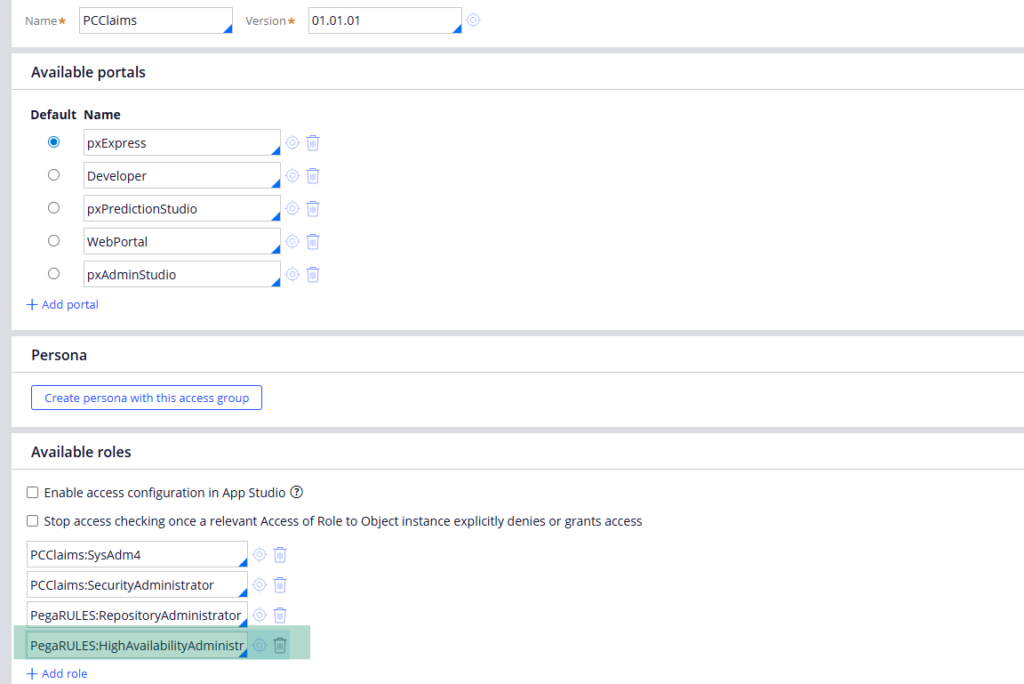
Once added, go to Configure – System – High Availability Management.
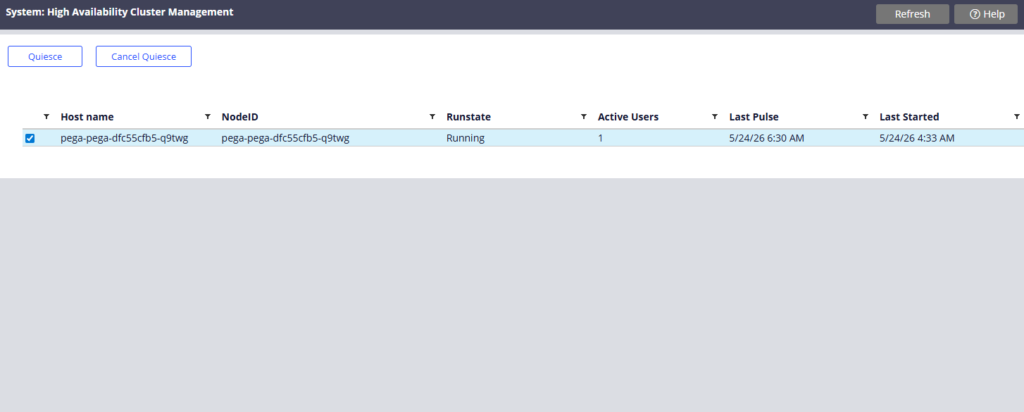
From there you can start the Quiescing process for your current node.
Pega also exposes this via API calls under the DevOps section in Admin Studio. You can queue specific nodes by node ID – useful when managing multi-node clusters remotely.
The Rolling Restart Pattern
Rolling restart applies Quiescing across a cluster one node at a time. Queue node one, wait for completion, bring it down, restart, add it back to the load balancer. Then repeat for node two. User sessions migrate between nodes as each one cycles. No users are dropped. Downtime is zero.
If you are managing an on-premise or client-managed Pega environment and need to do planned maintenance, this is the right pattern. Start Quiescing on the web node, wait for it to complete, then take the node offline.
Watch the Full Walkthrough
In the video below I walk through the full Quiescing process diagram – all six participants, all four stages – and demonstrate triggering Quiescing from the High Availability Management page in Dev Studio.
Session Quiescing is one of those infrastructure topics that most Pega developers never encounter – until they are responsible for keeping a production environment healthy during maintenance. Understanding it puts you in a much stronger position when that moment comes.

