

Close Menu
MyKnowTech
    MyKnowTech
    • Technical Blogs
    • Career
    • Partner Spotlight
    • Videos
    • Pega News
    • Services
    LinkedIn YouTube Facebook
    MyKnowTech
    Videos

    Application URL Alias in Pega

    Editorial TeamBy Editorial TeamMay 25, 2026Updated:May 26, 2026No Comments2 Mins Read
    Share LinkedIn Telegram Email WhatsApp Copy Link

    If you work with multiple applications in the same Pega stack, you have probably felt the friction of switching between them.

    Log in, switch application, work, switch back. It gets old quickly. Application URL alias, introduced in Pega 8.4, is a clean solution to this problem.

    What Application URL Alias Is?

    Every Pega application can have its own URL alias – a unique identifier that lets you launch that specific application directly in a browser tab. The URL follows a simple pattern: your Pega server URL, then /app/, then the alias identifier.

    When you create a new application, Pega automatically generates an alias for it.
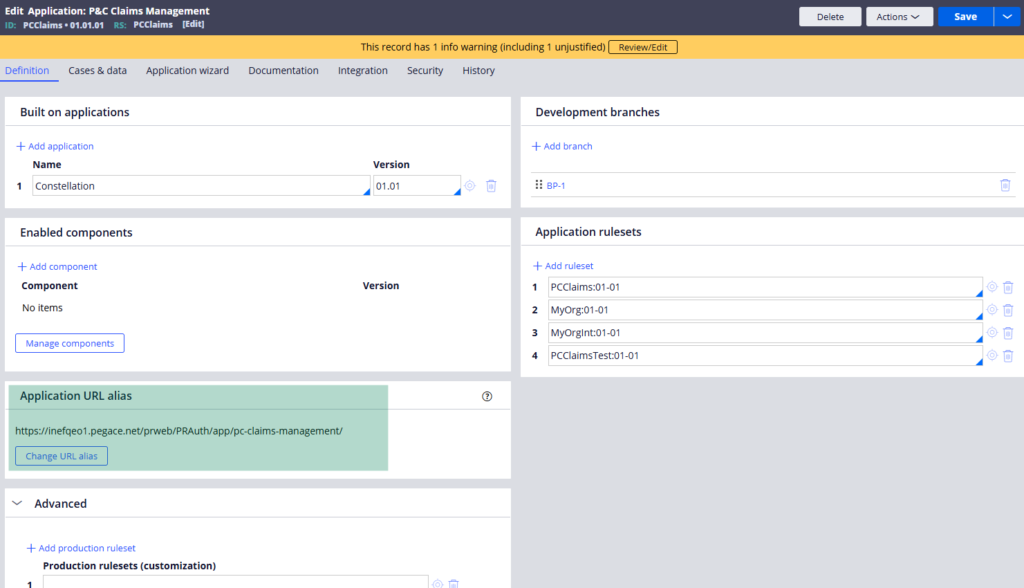
    You can see and change this in the application rule form under the application definition section. The auto-generated alias uses an underscore as a separator when Pega creates it by default.

    One important thing – if you plan to change the alias, do it before moving to production. Once users and systems start referencing the URL, changing it means updating it everywhere it is referenced.

    How It Works in Practice?

    Copy the application URL alias from the application rule and open it in a browser. Pega creates a new requester session specifically for that application and prompts you to log in. Once logged in, you are working exclusively inside that application.

    The powerful part is that you can do this for multiple applications at the same time – each in its own browser tab. Two applications, two separate requester sessions, running independently in parallel. No switching, no context loss.

    For business users who genuinely need to work across multiple applications simultaneously – checking data in one while processing cases in another – this is a significant quality of life improvement.

    Watch the Full Walkthrough

    In the video below I demonstrate launching two different applications simultaneously using their URL aliases, logging into each independently and working in both at the same time.

    Application URL alias is a small feature that makes a real difference in multi-application environments. Worth configuring before your application goes to production.


    Advanced
    Editorial Team

    An insightful team dedicated to empowering the Pega ecosystem with in-depth knowledge, guided by Premkumar Ganesan's vision.

    Related Posts

    Videos

    Understanding Components in Pega

    May 25, 2026
    Videos

    Understanding CORS Policy in Pega

    May 25, 2026
    Videos

    Content Security Policy in Pega

    May 25, 2026
    Videos

    Five Best Practices for Creating Connectors in Pega

    May 25, 2026
    Videos

    How to Plan a Pega Upgrade – A Practical Guide

    May 25, 2026
    Videos

    How to Analyse a Heap Dump in Pega

    May 25, 2026
    Videos

    How to Store Case Attachments in External File Storage in Pega

    May 25, 2026
    Videos

    Data Encryption in Pega Using HashiCorp Vault

    May 25, 2026
    Videos

    Understanding Stack Memory in Pega

    May 25, 2026
    Videos

    Packaging Your Pega Application for the First Time

    May 25, 2026
    Search through the blog
    Tags
    activity Advanced authentication background-processing Beginner case-management Constellation data-model declarative-processing email-processing file-processing Integration pega-core-concepts pega-integration process reporting security system-administration user-interface validation
    Pega Courses

    Pega courses can be accessed at https://myknowacademy.com

    About

    MyKnowTech is a boutique Pega enablement and consulting firm – helping organizations build internal Pega capability through structured training programs, Centre of Excellence setup and hands-on architecture guidance.

    Company
    • About
    • Leadership
    • Career
    • Contact
    Resources
    • Technical Blogs
    • Career
    • Partner Spotlight
    • Videos
    • Pega News
    • Services

    ©  MyKnowTech B.V. All Rights Reserved.

    • Sitemap
    • Terms & Conditions
    • Privacy Policy