


When something goes wrong in a Pega application, the log files are your first stop. Understanding how Pega’s logging system works makes debugging significantly faster.
How Pega’s Logging Framework Works
Pega uses the Log4j logging framework. Three components work together – loggers capture messages, formatters define the message structure and appenders write messages to specific files.
Log levels determine what gets captured. From least to most verbose: fatal, error, warn, info, debug, all. If a logger is set to error level, it captures error and fatal messages. If set to debug, it captures everything – debug, info, warn, error and fatal. For debugging, always switch to debug mode so you see the full picture of what happened before an error.
Finding Your Log Files
Go to Configure – System – Operations – Logs.
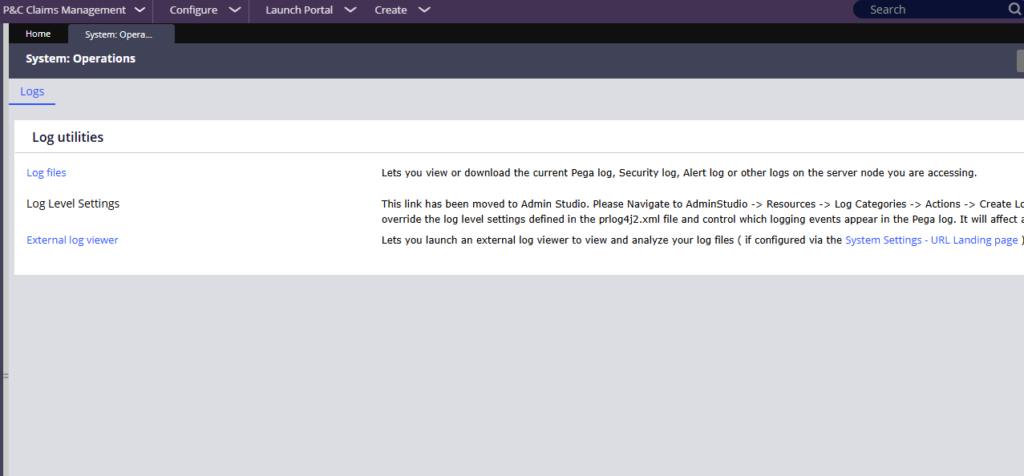
From there you can access the log files directly. Pega keeps separate files for different purposes – the main Pega rules log, an alert log, a BICS log, a data flow log and others. You can view them in the portal or download them as text or zip files.
Log Categories and Loggers in Admin Studio
Log categories group related loggers together. Pega ships many out-of-the-box log categories – there are already dedicated categories for REST, SOAP, SAML, BICS and more. Before creating a new one, search what already exists.
To create a log category, go to Admin Studio – Resources – Log Categories – Actions – Create Log Category.
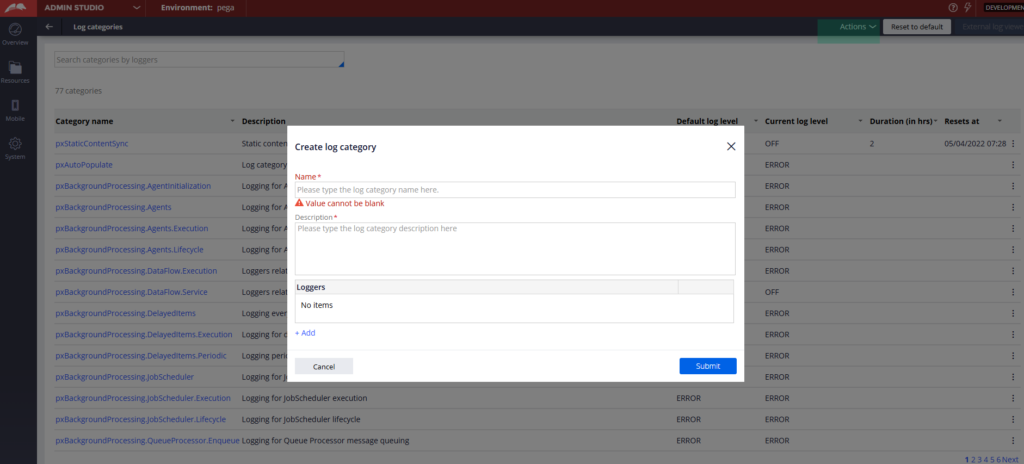
Give it a name and add the logger class names that should be captured under it. Logger class names come from the Java code behind your Pega activities – you can find them by clicking View Java on any activity.
Once a log category exists, you can change its log level. Go to the category, click Change Log Level and select debug. Importantly, use the reset option – set a time limit of one or two hours after which Pega automatically resets the log level back to normal. Without this, debug-level logging will keep flooding your log files indefinitely.
Logging from Your Own Activities
The log message method in activity rules lets you push your own entries into the log file. Set the log level – error, warn, info – and provide your message. If you want to capture a stack trace alongside the message, enable the generate stack trace option.
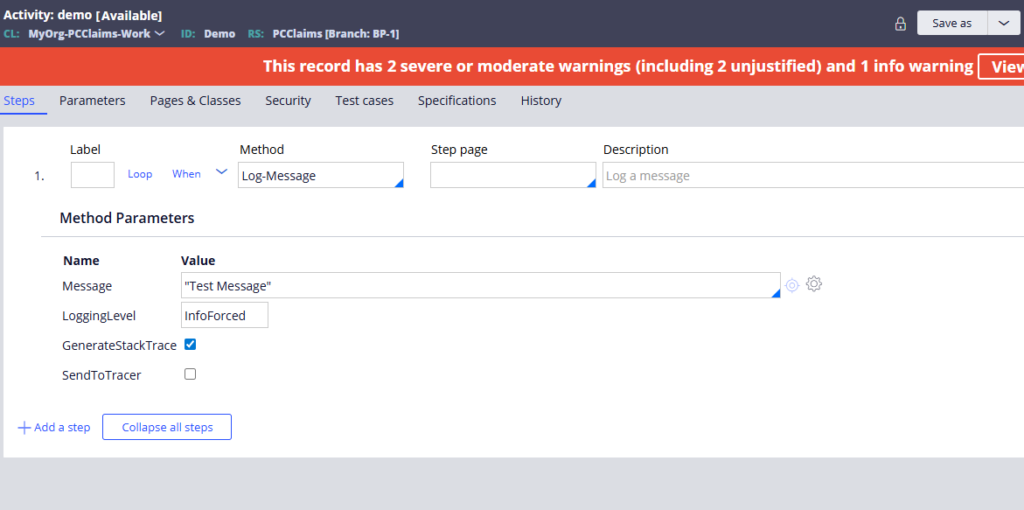
Use this for error handling in your activities. When an external connection fails or a case cannot be found, log an entry so the issue is traceable in production.
One thing to note – info-level messages from the log message method are not captured by default. If you need to force an informational message into the log regardless of the current log level, use the info forced method variant.
The Log4j Configuration File
The prlog4j2 XML file in your Tomcat webapps directory defines how all logging behaves – which appenders exist, which log files they write to, what filters are applied and the rolling policy. By default Pega uses a size-based rolling policy (250MB) so log files get archived when they reach that size.
You can create custom appenders pointing to new log files, and direct specific loggers to write there. This is an advanced topic but worth knowing if you need to isolate logs for a specific integration or process.
Pega Diagnostic Cloud
PDC is Pega’s cloud monitoring platform. An out-of-the-box agent – the AES remote agent – ships data from your Pega application to PDC. Once connected, PDC gives you dashboards covering events, performance issues, database health and server statistics. It is the recommended monitoring tool for production Pega environments.
Watch the Full Walkthrough
In the video below I walk through finding log files in the portal, creating a custom log category in Admin Studio, changing the log level to debug, running an activity and finding the log entries, adding a log message method to an activity and an overview of the log4j configuration file.
Logging is one of those topics that feels basic until you are staring at a production incident at midnight. Getting comfortable with log categories and log levels before that happens puts you in a much stronger position.

