

Attachments are one of the most common attack surfaces in enterprise applications. A user uploads a file – and if you are not checking what is in it or what type it is, you are accepting risk.
Pega gives you three layers of attachment security.
- Attachment category privileges control who can create, read, edit and delete.
- Virus scanning checks file content against an antivirus server.
- File type restriction blocks uploads that do not match your allowed extensions. This post covers the second and third.
Virus Scanning – The Architecture
On Pega Cloud, Pega handles virus scanning automatically. Nothing to configure.
For client-managed or on-premise deployments, you are responsible. The approach is to connect Pega to an external antivirus server via API call from a custom extension activity.
Pega ships an out-of-the-box extension activity called CallVirusCheck.
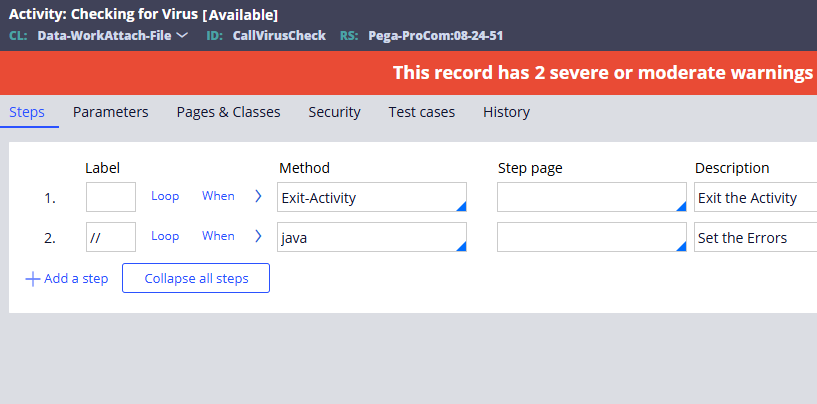
By default it does nothing – it just exits. The design is intentional. You save as this activity into your implementation ruleset, add your own virus scanning logic, and Pega calls it automatically whenever a file is attached.
In the below video, the steps were explained how to use ClamAV anti-virus software to perform the virus scan.
File Type Restriction
Virus scanning checks content. File type restriction checks the extension. Both are useful – they catch different things.
The simplest approach is to extend the same CallVirusCheck activity with a few lines of Java code. Get the file name from pxAttachName, extract the extension and compare it against your allowed list. If the extension is not in the allowed set, set the same failure flag as you would for a virus detection. The upload is blocked with an error message.
For example, if you only want to allow PDF uploads – get the extension, check if it equals PDF (case insensitive), and if not, flag it as an error.
A practical note – do not apply this restriction blindly across the whole application. Different parts of your application may need different allowed file types. Consider whether the restriction should apply at the attachment category level, the case type level or the specific form where the upload happens.
Watch the Full Walkthrough
In the video below I walk through the full setup – running ClamAV in Docker, importing the Java client JAR, specialising the Check for Virus activity, testing with a clean file and a simulated virus file, then adding file type restriction and testing with both PDF and non-PDF uploads.
Attachment security is one of those things that gets skipped until an incident happens. Setting it up properly is not complicated – and it is a lot easier to do before go-live than after.

