


This is the first blog article in the Docker series. Here we will talk about some basic containerisation terminologies.
What is containerisation?
Is the process of packaging applications with the source code and all its dependencies.
The containerised application should be able to run on any environment or infrastructure – In any physical machine, in any virtual machine, or in any cloud platform.
Bare metal Vs Virtualization Vs Containerisation
Bare metal
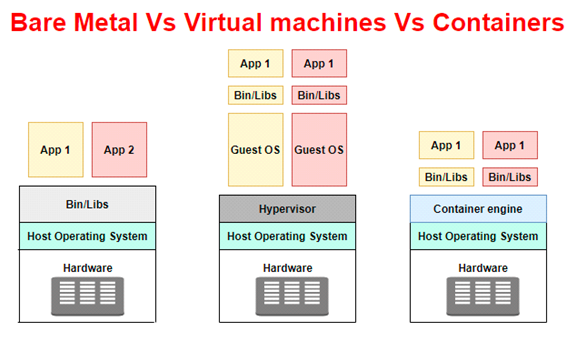
It refers to a single physical server. We know that to run any software, we need the hardware elements of a single computer – server, an operating system with right memory and storage. Most of the organizations have their own data centres, where the physical servers are located in a kind of secured environment, think it like a server room.
In the olden days, bare metals were mainly used to run applications. The main disadvantage is, to run a different instance of an application we may need different physical hardware/server, which comes at the expense of capital cost, maintenance cost, etc.
Virtualization
It uses software to create an abstraction layer over the hardware. It means the hardware elements like processors, memory, storage can be divided into multiple virtual servers. These virtual servers are usually referred to as VMs or virtual machines. Each VM has its own Operating system and behaves like an independent computer.
It means you can virtualize more than one server in a single bare metal or a physical computer. It also means you can run a different instance of an application on different virtual machines in a single hardware. So definitely it cuts down the hardware cost.
In the virtualization world, you will hear another term called hypervisors – software that serves as an interface between virtual machines (VMs) and the underlying hardware so that each VM gets access to the required physical resources. VMware, Virtual box are different examples of hypervisors.
The main advantage is, hardware can be properly utilized in an organization and definitely brings down the cost and maintenance power.
In today’s world, You will see virtual machines getting used in almost all the organization.
The virtual machines also drive cloud computing, where cloud datacentres run different virtual machines in their hardware to support cloud customers.
One disadvantage is, it virtualizes an entire server including its own operating system (OS). The OS libraries help to run one application. Here we are kind of duplicating the unnecessary packages for each application we want to run.
Containerisation
It is an operating system virtualization where you can deploy multiple applications using the same operating system on a single server.
Unlike how Virtual machines replaced the bare metals, containerisation is not a replacement to virtualization, at the end, containerised applications will be running on the virtualized machines.
Containerisation is all about how to package your application with all your dependent libraries so that your application can run on any type of server or in cloud platforms.
Similar to how Hypervisors help in achieving virtualization, Container engines help in achieving containerisation by operating system level virtualization. There are different container engines in the market – Docker, mesos etc
Benefits of containers
1. Easy portability
When an application is containerized with its dependent binaries and libraries, then it can easily be deployed to different hardware platforms and different operating systems.
2. Easy maintenance
Containers are lightweight and easy to maintain application-specific dependencies.
3. Consistency
No more developer complaints that the application works fine on my machine and not on your machine!! Containers whatever environment they are deployed will behave the same.
4. Agility
As we saw before, containers do not need an operating system boot, they can be started, created, and destroyed in seconds.
5. Resource efficiency
When you start a container, it consumes the necessary configured resource from the host machine and when it is destroyed/removed, then the resources are released back. This will be very effective when you want to run a particular job for a time period, think like a BIX job which runs 3-4 hours daily. You may have dedicated VMs for it, which will be idle and unused for a long period of time. Instead, if you containerize the BIX job, you can get the resource, run the job and release the resource back for other containers.
Container orchestration
In production, you may need to run multiple containers and needs to be managed correctly. There are many container orchestrations that can help to manage all the container operations.
There are different container orchestration tools in the market and one of the popular tools is Kubernetes. Kubernetes supports multiple container runtime engines including docker and helps to automate and scale the container workloads in the Production environment.
Hope you got some basics about containerisation Feel free to read more on containers. In the next article, we will see some basics about the Docker container engine.

