


The Use Case
A lease request application manages its core process in Pega, but all customer details are stored in an external CRM – say a Siebel system. To retrieve customer data, Pega needs to make an API call rather than hitting its own database directly. The data type handles this cleanly, with data pages managing the API calls behind the scenes.
Creating the Data Type
In App Studio, start a new data type at the organisational layer so it can be reused across multiple applications. When selecting the system of record, choose to create a new external system rather than using the local Pega database.
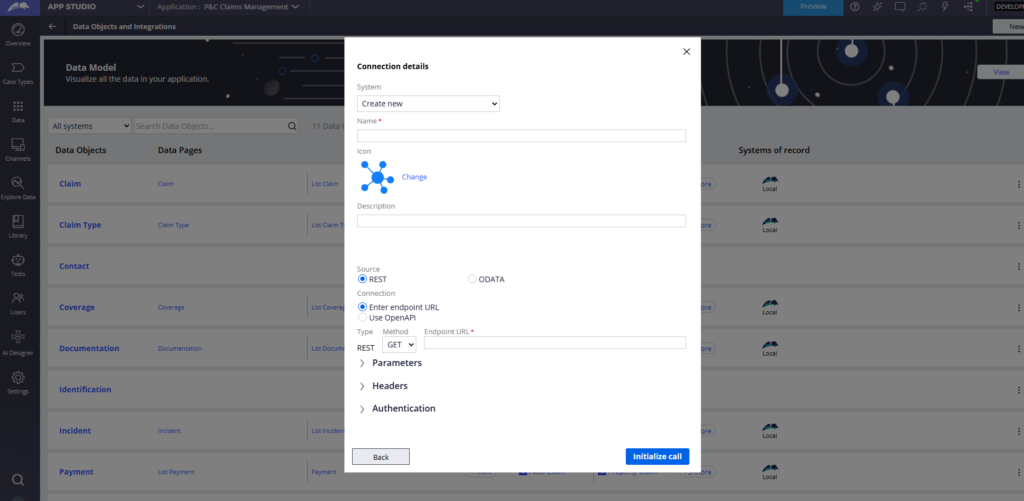
Give the system a name – for example Siebel CRM – and select REST as the connection type. Pega also supports OData if your external system uses that standard, but REST covers most real-world scenarios.
Enter your endpoint URL with an example parameter – for example customers/1 – and define the parameter name (customer ID). Hit the API to get a live response. If your endpoint returns customer ID, customer name, country and city, Pega lists all those fields and lets you add them all to the data model in one click.
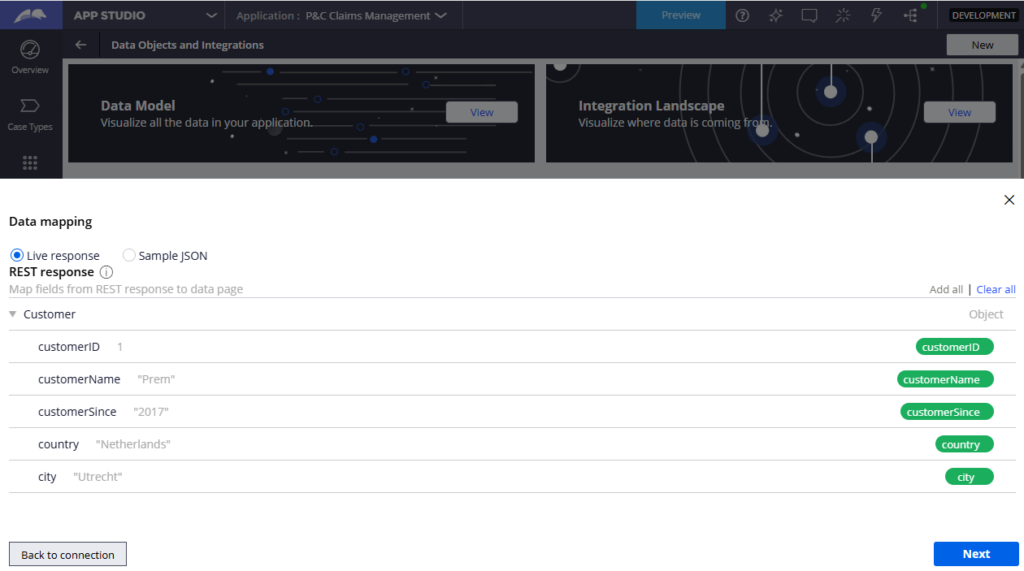
What Pega Creates Automatically
After submitting, Pega creates the data object with all mapped properties, a Connect REST rule pointing to your endpoint, a read data page that calls the connector and maps the JSON response to Pega properties via a data transform, and two application settings rules – one for the endpoint URL and one for the authentication profile.
Keep the auto-generated naming conventions as-is. They follow a standard pattern and changing them causes confusion later.
The endpoint URL application setting is environment-specific. If you have separate URLs for dev, staging and production, update them there rather than in the connector rule directly.
Adding CRUD Operations
The auto-created data page handles the read (GET). For create, update and delete, you configure save options either manually in App Studio or by creating a savable data page and adding save plans.
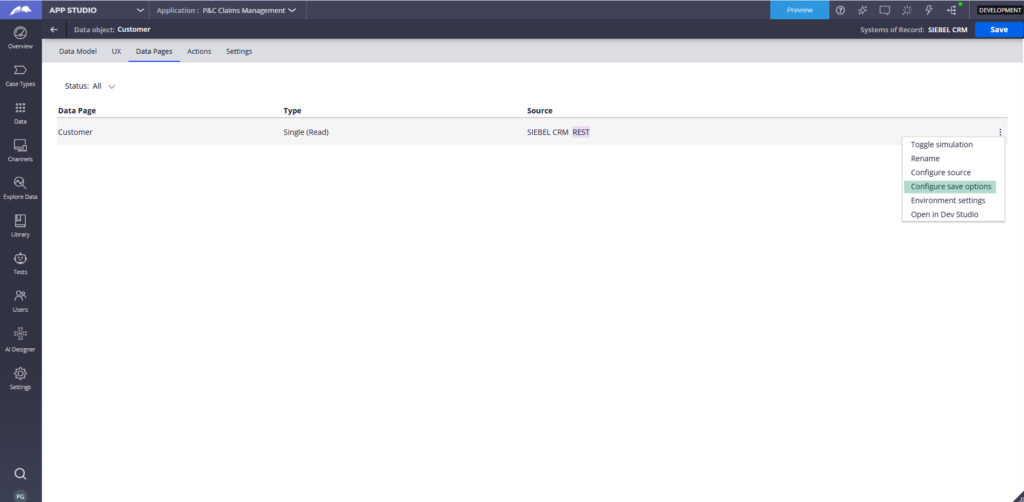
Each save plan maps to a different API operation. For a delete plan, specify the delete endpoint with the customer ID parameter, leave the response mapping empty and check for a 200 status code to confirm success. Map the request parameter – customer ID from the data page to the API path parameter.
Once saved, Pega upgrades the data page to a savable data page automatically. You can add multiple save plans covering post, put, patch and delete depending on what your external system supports.
Watch the Full Walkthrough
In the video below I walk through creating a customer data type pointing to a WireMock stub API, mapping the response fields, reviewing the auto-created connector and data page rules, and adding a delete save plan to turn it into a fully savable data page.
External system data types are how real enterprise Pega applications handle CRM, ERP and other third-party data sources cleanly. The App Studio wizard handles most of the setup – the key is understanding what gets created under the hood.

