


The data instance first design pattern is not new. It has been in Pega for years.
File listeners do exactly this – parse records from a file, save each one as a data instance into a dedicated table, then trigger a case from the background. That is the same pattern. What Constellation improved is the ability to surface it cleanly in the user interface – so business users can browse data objects and create cases directly from them.
The Use Case
Think of a candidate pipeline for job applications. Candidates come in from different sources. You collect their details into a data object – not a case – because you do not want to create a full interview case for every applicant immediately. Only when a candidate is ready to progress do you create the interview case, with their data already referenced.
The same applies anywhere you collect data first and act on it selectively later. Customer onboarding, mortgage applications, insurance quotes – wherever the data exists before the process begins.
The Setup
There are three things to have in place before this works.
First, a data object with the records you want to act on. In this example, a customer data object with customer name and other details already populated.
Second, a data reference property on the case type that points to the data object. When the case is created from the data instance, this property stores the reference so the case knows where its source data came from.
Third, the data object needs to be configured as a landing page in your application’s navigation, so business users can browse and interact with the records.
Configuring the Actions
Open the data object in App Studio and go to the Actions tab. Here you can configure what a user can do from each record in the data list.
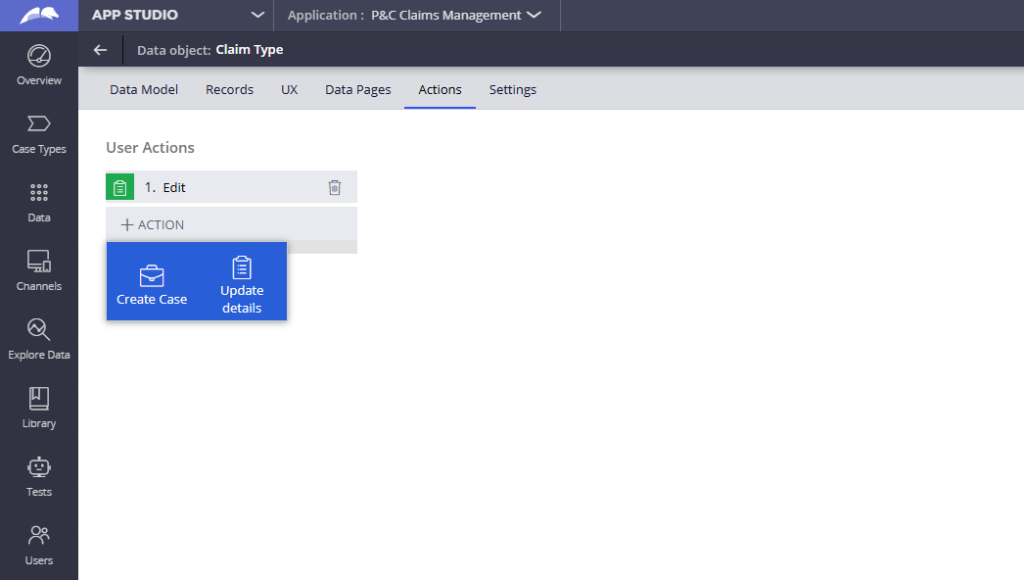
Add an Update Details action – this lets users edit the data instance directly from the list view, selecting which fields should be editable.
Add a Create Case action – select the case type you want to create and specify the data reference property on the case type that should hold the reference to this data instance.
Save. That is essentially the full configuration.
How It Looks in Practice
Business users open the customer landing page, see the list of customers and, for each record, can either update the customer details or create a new mortgage case.
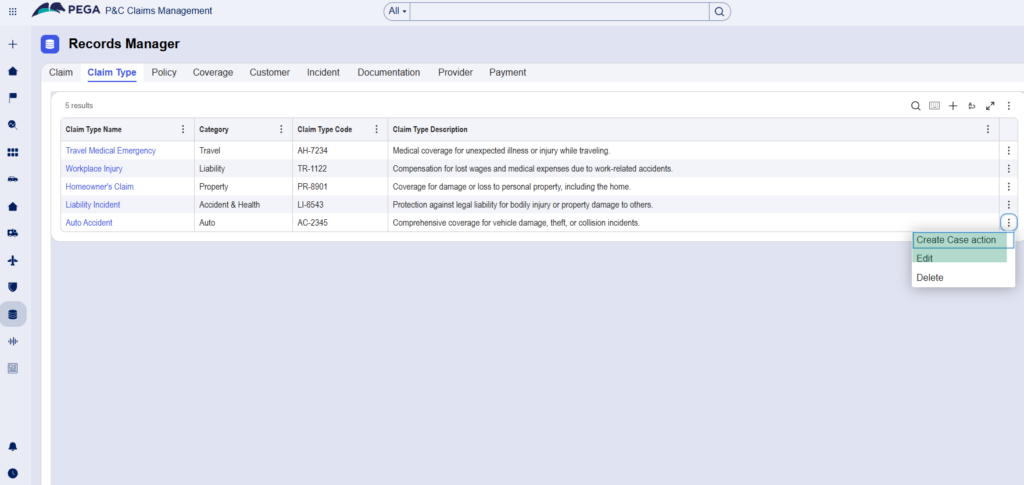
When they create the case, the customer reference is automatically populated. The case is created with the data already linked – no manual re-entry.
Watch the Full Walkthrough
In the video below I walk through the full setup – creating the data reference property on the case type, configuring the Update Details and Create Case actions on the data object, adding the landing page to navigation and testing the full flow from data instance to case creation.
The data instance first pattern is one of those things that feels obvious in hindsight. Collect the data first, then let the business decide when and whether to act on it. Constellation just makes it much easier to surface that pattern cleanly to users.

