


After a server restart or major deployment, Pega clears all its caches most of the time and may need a cache rebuild! The first users to open the application after that pay the price – rules need to compile, Java classes need to generate, and everything feels slow. The Static Assembler exists specifically to solve this problem.
Why Rule Assembly Matters
Every Pega rule that drives behaviour – activities, UI, processes – is backed by Java code. When a rule runs for the first time after a cache clear, Pega compiles that Java code on demand. That compilation takes time, and end users feel it as application lag.
The Static Assembler lets you pre-compile those Java classes before anyone touches the application. The cache is ready before the first user logs in.
When to Use It
The most common scenarios are server restarts, major deployments, upgrades, and any situation where you have pushed a significant volume of rule changes. Any time your rule cache is going to be wiped, running the Static Assembler after the deployment is a sensible step.
Not every rule needs assembly. Pega only assembles the rules that are backed by Java code, so the assembler identifies that specific set automatically – you do not need to figure it out manually.
How to Run the Static Assembler
Navigation is simple. In Designer Studio, go to Configure -> System -> Assembly -> Static Assembler.
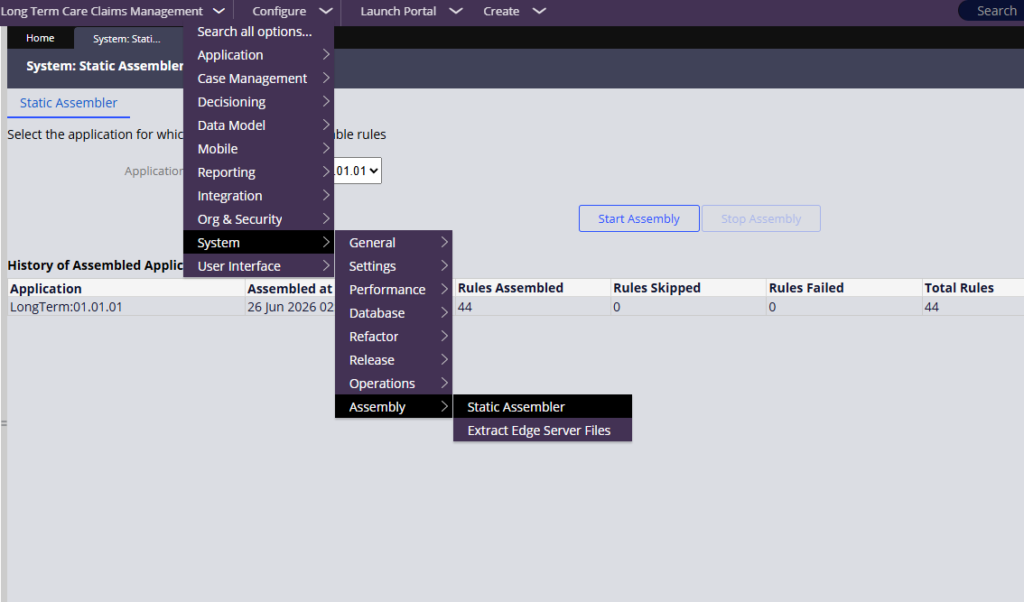
Select your application from the list and click Start Assembly. Pega will scan for the rules that need assembly, compile the Java classes, and show you a log of what it processed. Once it finishes, the assembly log confirms everything is complete.
In a production system with a full application, you will see far more rules in that log. The process is the same – it just covers more ground.
A Note on Extract Edge Server Files
You may notice another option on the same screen called Extract Edge Server Files.
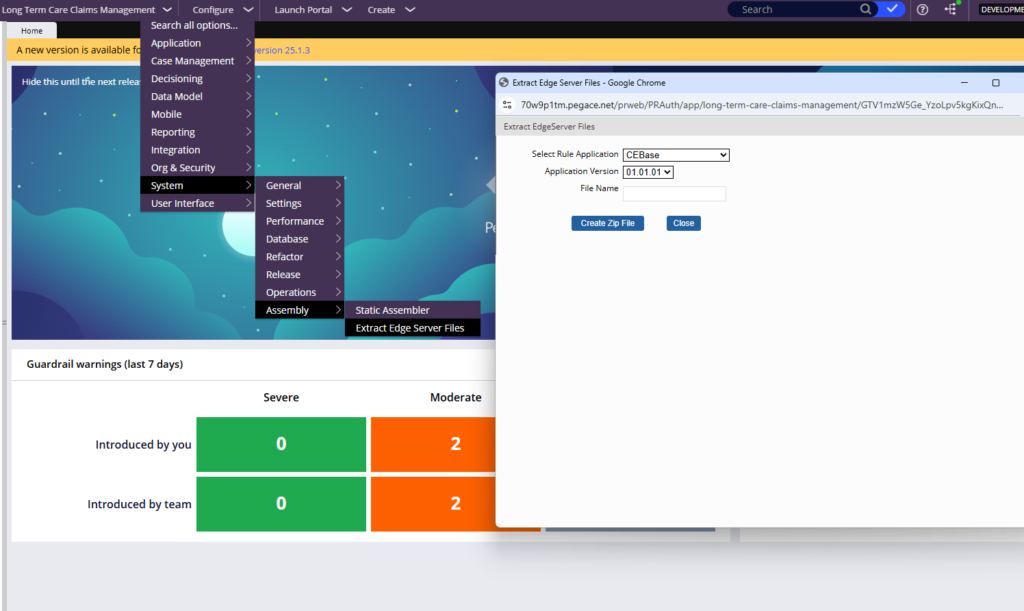
This is for serving static content through dedicated edge or CDN servers – useful for large customer-facing Pega applications where you want images and static files served from geographically distributed locations. It is not something most Pega projects need to worry about, so the Static Assembler is the relevant option for most teams.
Watch the Full Walkthrough
Watch the video below to see the Static Assembler in action, including the navigation path and what the assembly log looks like after it runs.
Make running the Static Assembler part of your deployment checklist. It is a small step that makes a noticeable difference to application performance the moment users come back after a restart.

