

Before installing Pega for the first time, it helps to understand the architecture behind it. This becomes especially useful when planning a new project, debugging deployment issues, or simply understanding what is running under the hood.
Why Container-Based Deployments Are the Future
Pega now supports only container-based deployments going forward. VM-based deployments are already deprecated andcompletely unsupported from version 25 onwards.
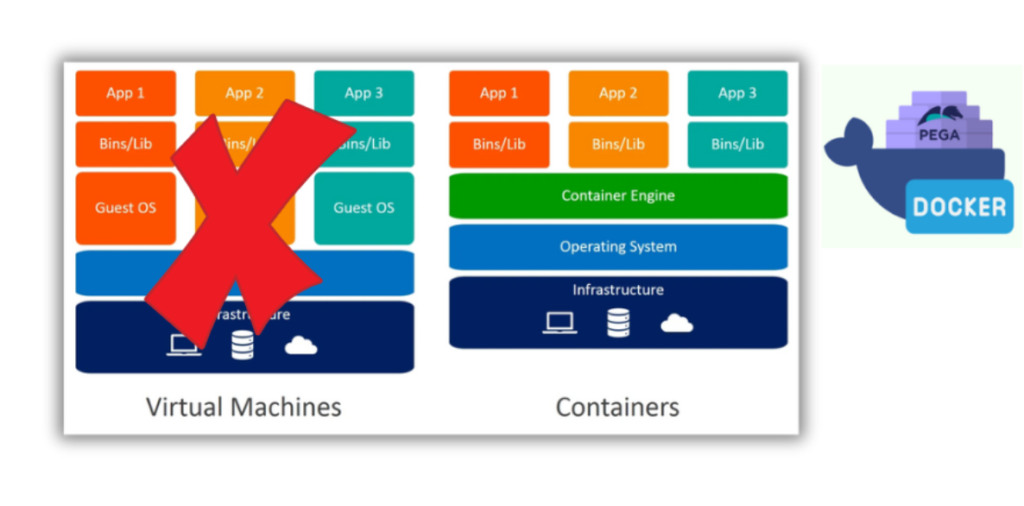
The reasoning behind moving from virtual machines to containers is well documented elsewhere, so we will not repeat it here. What matters is that Pega ships Docker images that can be deployed and run as a Pega application, with Kubernetes handling the orchestration of these containers.
Running Pega is not just about the Pega containers themselves. There are several externalised services involved, and this is exactly where Kubernetes helps – orchestrating Pega alongside the broader microservice-based architecture it depends on.
The Three Pega Deployment Options
Pega supports three deployment options, and Kubernetes can be used across all three:
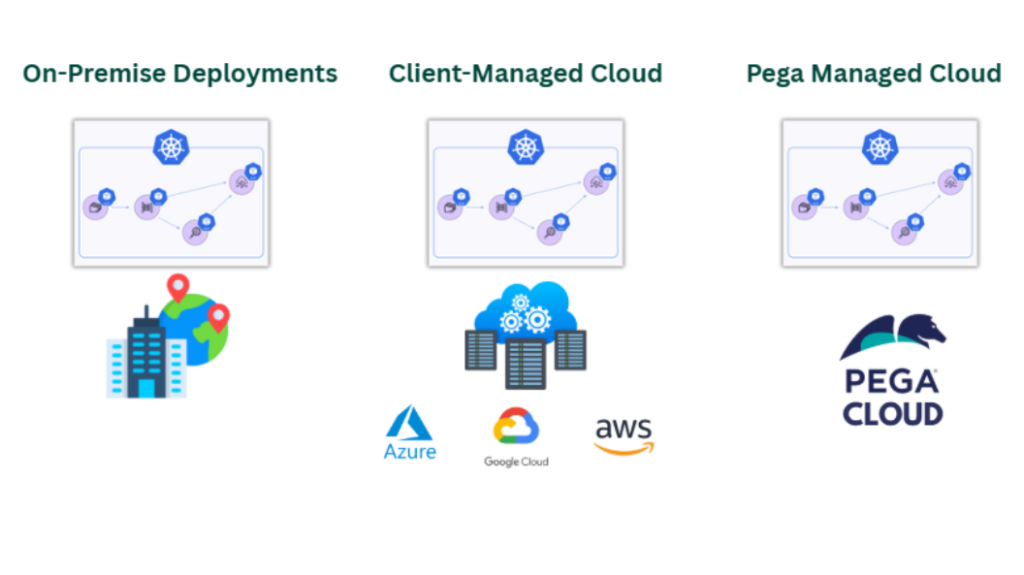
On-premise deployment means running everything in your own data centre, including your Kubernetes cluster.
Client-managed cloud is the more common choice. Enterprises use their preferred cloud platform – Azure, Google Cloud, AWS, or others – and deploy Pega as Kubernetes pods within their own cloud environment, managing the deployment themselves.
Pega Cloud is Pega’s SaaS offering. As a customer, you subscribe to it and Pega takes care of the infrastructure, letting your team focus on delivering business value.
For on-premise and client-managed cloud, you are responsible for the installation. Pega provides the files, but the setup is on you. With Pega Cloud, none of this installation work is required. Still, understanding this architecture is valuable for any LSA, both for general knowledge and for debugging purposes.
Client-Managed Cloud Architecture Walkthrough
A typical client-managed cloud setup (this example is based on 8.8, though little has changed in later versions) consists of a Kubernetes cluster containing the Pega application, backing services, and client-provided technologies.
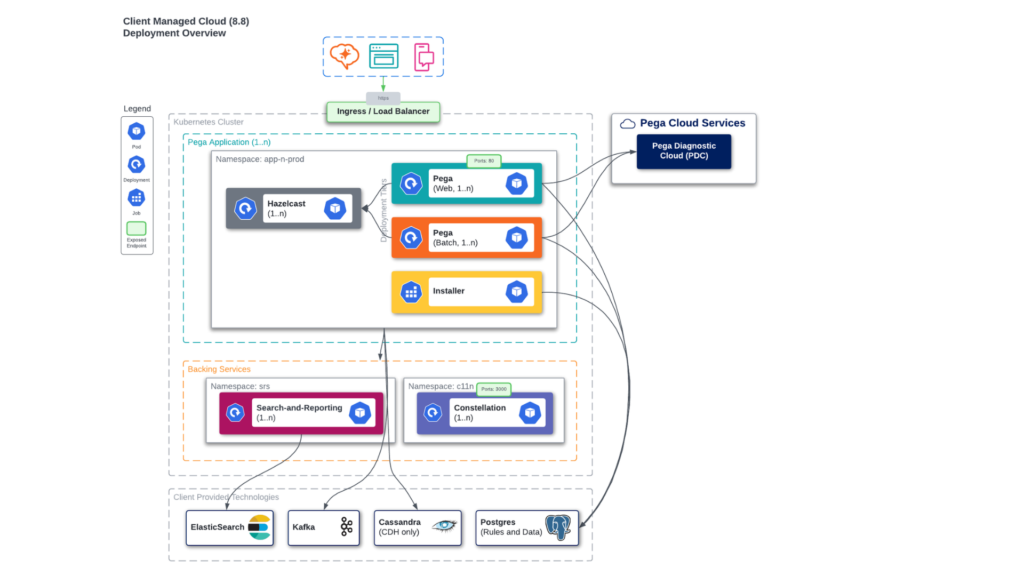
The installer handles installing Pega rules and the Pega platform into Postgres. Once installed, Pega runs on a web server such as Apache Tomcat.
Pega is backed by several supporting services. Search and Reporting Service (SRS) sits between Pega and an external Elasticsearch or OpenSearch instance. If you are running your own client-managed cloud, you will also need the Constellation service (App Static service) up and running as part of the backing services.
For client-provided technologies, you have flexibility in what you use. Elasticsearch or OpenSearch, Kafka (many cloud providers offer managed Kafka), Cassandra, and Postgres can all be deployed using your chosen technologies. Pega provides Docker files for the backing services, but for these client-provided components, you choose your own.
A Look at Pega on AWS
Looking at a VM-based deployment on AWS shows a similar structure – Pega application web nodes and batch nodes, Hazelcast running externally, and an ingress acting as a load balancer to split traffic across nodes.
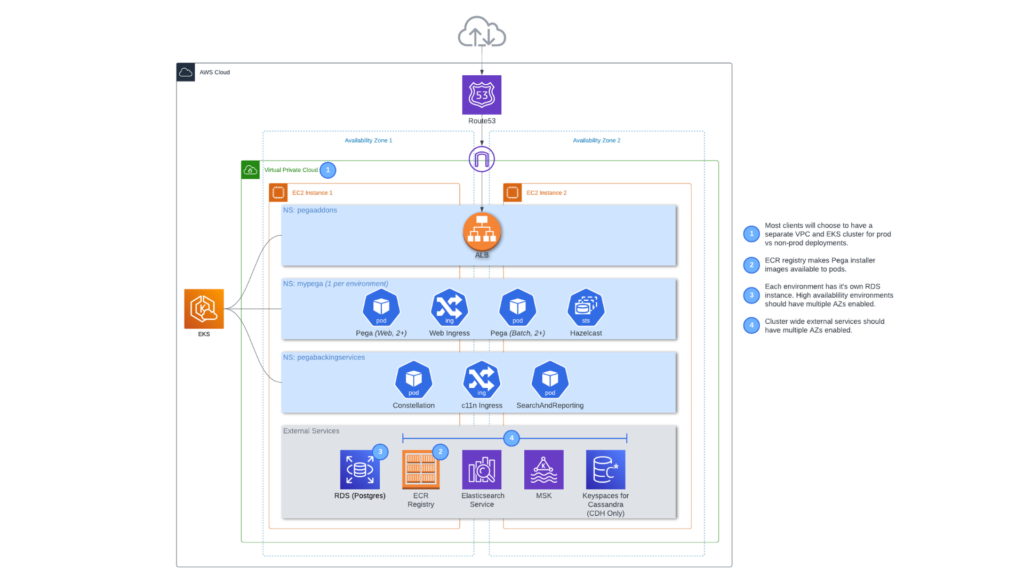
The same backing services appear here too – Constellation and Search and Reporting.
What differs are the AWS-specific managed services. RDS provides the managed Postgres service. ECR is the container registry (Azure has its own equivalent). Elasticsearch and Kafka are also available as managed services, with Kafka appearing as MSK on AWS. These specifics change depending on whether you deploy to AWS, Azure, or Google Cloud.
These components – provided as Pega-supported images – get deployed under a backing services namespace. Pega also provides an add-ons namespace, which on AWS includes the ALB (Application Load Balancer), specific to that cloud.
At the infrastructure layer, you will have availability zones and VPCs, all contributing to the EKS cluster – AWS’s managed Kubernetes service. Azure’s equivalent is AKS, and naming will vary by cloud provider, but the high-level Kubernetes cluster concept connecting to external services remains the same.
Watch the Full Walkthrough
The full explanation, including a closer look at both architecture diagrams, is covered in the video below.
With this architecture in mind, the next step is preparing for a VM-based deployment – useful groundwork before moving on to Kubernetes and Helm charts in later lectures.

