


Pega’s low-code approach extends all the way down to database queries. You configure rules. Pega generates and executes the SQL. Understanding the abstraction layer makes you a better developer and a much faster debugger.
The Rules That Abstract SQL
There are several ways Pega executes database operations, each suited to different scenarios.
Activity OBJ methods are the most granular. OBJ browse executes a select query with filter conditions. OBJ open retrieves a specific instance by key. OBJ save and OBJ delete handle inserts, updates and deletes. You configure the method – class, filter conditions, sort order – and Pega generates the SQL.
Report definitions are the recommended way to query data for reporting and display. You define the table (via class), the columns to return, the where conditions and sort order. Pega converts this into a SQL select query. Report definitions can also join across multiple tables.
Data pages were originally read-only, executing select queries via lookup or report definition sources. Recent versions added savable data pages, which can handle insert and update operations as well. Data pages are also the right abstraction layer to sit between your rules and any database query – they decouple the source from the consumer.
Connect SQL is for cases where you need to write your own query directly – typically for external database tables where no class mapping exists, or for complex queries that cannot be expressed through OBJ methods alone.
What Actually Gets Executed
The best way to understand the abstraction is to watch the SQL in the tracer.
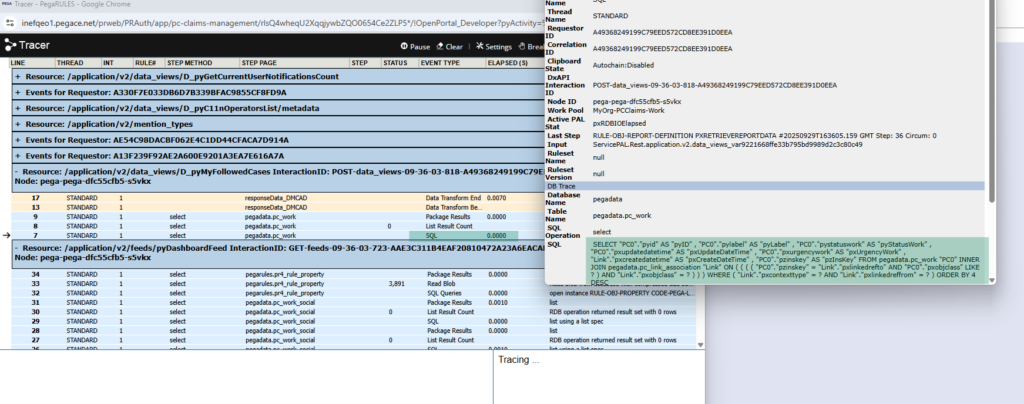
Enable DB queries in the tracer settings, then run any activity or data page. The blue lines in the tracer are database operations. Click on any SQL entry to see the exact query Pega generated and executed against the table.
A few things worth knowing from watching these queries.
OBJ browse with an equals condition generates a standard where clause with an equals operator. With starts with, Pega generates a left-anchored LIKE query – the wildcard is placed at the end. With contains, it generates a full-text LIKE with wildcards on both sides. Contains is expensive – avoid it on large tables in production.
OBJ open followed by OBJ save generates a select first, then a merge operation. The merge handles both insert (new instance) and update (existing instance) in one operation. Do not be confused by seeing an insert in the SQL when you expected an update – the merge takes care of the logic correctly.
A Practical Note on Contains
Every time you use a contains condition in a report definition or OBJ browse, Pega wraps the search value in wildcards on both sides. This prevents the database from using an index on that column. On a large table with millions of rows, this will cause full table scans and severely impact performance.
Use starts with or equals where possible. If contains is genuinely required, make sure you have thought through the performance implications and discussed them with your infrastructure team.
Watch the Full Walkthrough
In the video below I walk through the three main abstraction rules – OBJ methods in an activity, a report definition and a data page – running each one in the tracer and reading the generated SQL to show exactly how Pega converts low-code configuration into database operations.
Understanding how your configuration translates to SQL is one of those skills that pays off continuously. When a report is slow or a query is timing out, knowing what Pega is actually running against the database tells you exactly where to start.

