


At some point in every Pega project, the development is done and you need to move it to a higher environment. The packaging wizard is how you do it for the first time.
Understanding what goes into a package – and why – makes you a more confident LSA or lead developer when deployment time comes.
What Packaging Actually Does
Pega packaging creates a product rule. A product rule is what Pega uses to generate the JAR file that gets deployed to the target environment.
A product rule needs to contain two types of content – rule instances and data instances. Rule instances are your source code: activities, data transforms, sections, flows, all the technical rules you built. Data instances are configuration records: access groups, operators, work queues, organisation structure, database table definitions, integration resources.
Rule instances travel with the application stack. When you select an application to package, all its rule instances come automatically. Data instances are what the wizard walks you through individually – because you need to decide which ones to include.
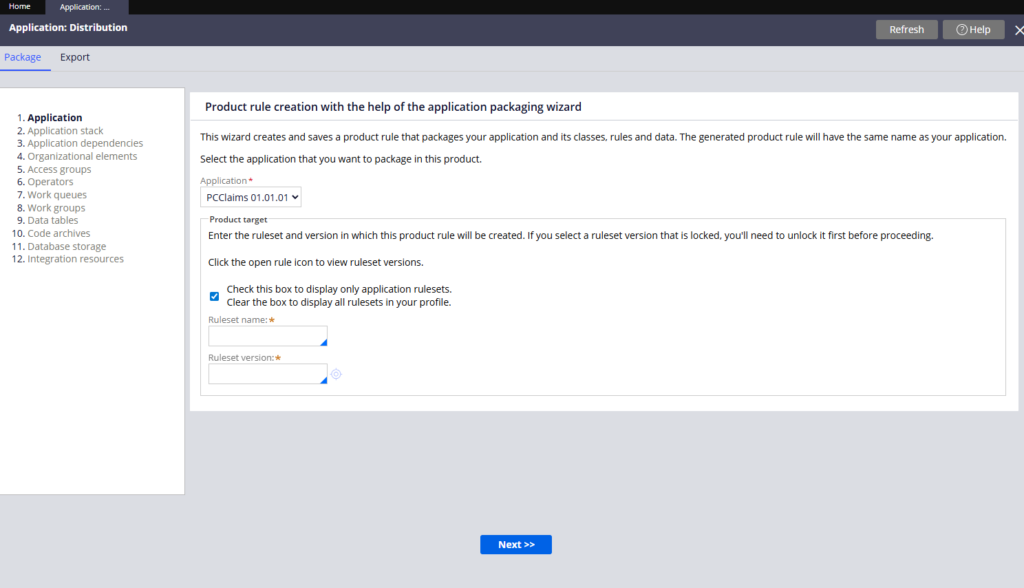
The Packaging Wizard – Step by Step
Go to Configure – Application – Distribution – Package.
What You Get at the End
The wizard creates a product rule containing everything you selected. You can open it to verify – the rule instances come from the application selection, the data instances are listed individually by their unique identifiers.
From the product rule you can export a JAR for manual import, or use Pega’s deployment tools to migrate directly to a target environment. That is covered in a separate video.
Watch the Full Walkthrough
In the video below I walk through every step of the packaging wizard for the Claims App application – selecting applications, choosing data instances and verifying the resulting product rule contains everything needed.
Packaging for the first time is something you will do on every Pega project. Knowing which data instances to include – and why – is what separates a clean deployment from one that needs manual fixes on the other side.

