


If you are an LSA, lead developer or Pega administrator, upgrade is going to land on your desk at some point. Get some experience with it. It adds real value to your profile.
I have led Pega upgrades a couple of times. Here is how I approach it from start to finish.
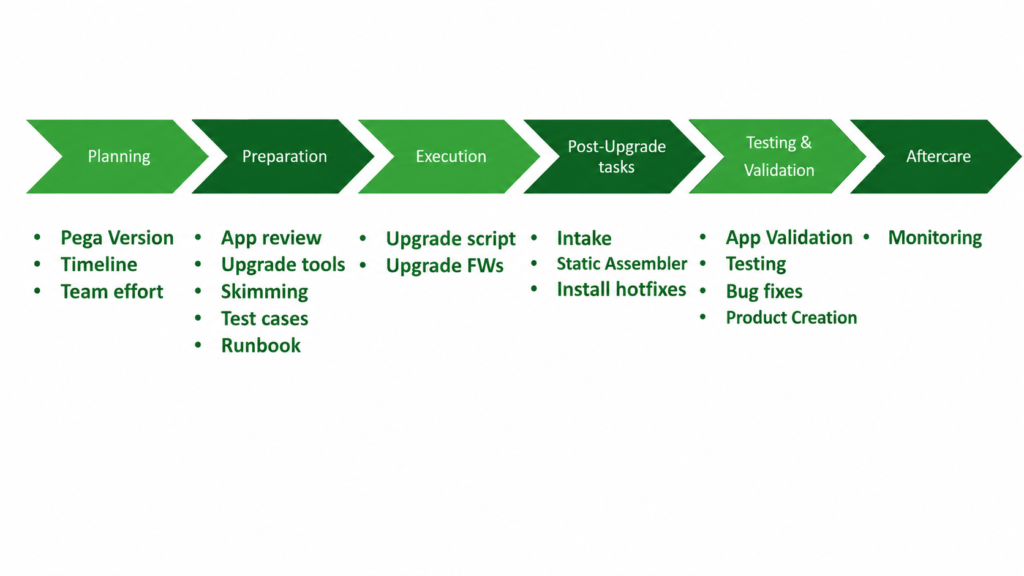
Choosing the Target Version
Pega will always recommend upgrading to the latest version. My advice is slightly different – consider N minus one. If 24.1 is the latest, go to 23.1. A brand new release carries more risk than a version that has been in the field for months with hotfixes applied.
That said, always check what features each version brings. GenAI capabilities, Constellation improvements, new framework features – these are real business cases you can use to get stakeholder alignment on the upgrade.
Planning and Timeline
Upgrade is not a one-night job. You need dedicated sprint capacity, and if multiple teams share the same Pega environment, everyone needs to be aligned on the timeline.
High-level T-shirt sizing early – small, medium, large – helps set expectations. But your real timeline becomes clear once you have done the app review and run the upgrade checker tool. These two will surface technical debt, UI guardrail violations and compatibility issues that directly impact your upgrade effort.
Never skip the upgrade checker. It is officially provided by Pega and in my experience it consistently pays back the time spent on it.
Preparation Phase
Before any upgrade scripts run, your team needs to complete several things.
Run the app review and fix upgrade checker findings. Guardrail compliance and UI customisations have the most impact on upgrade complexity – especially in applications that have been through multiple Pega versions.
Define your test plan and test cases before the upgrade starts. Upgrade time should be full focus on testing, not creating test cases from scratch.
Consider skimming if you have a heavy rule base. Skimming lightens your application context and is worth doing ahead of a major version jump.
Prepare a run book template. It will get updated during execution, but the high-level structure should be ready.
Execution
The upgrade itself runs via a shell or batch script with input parameters. It handles the platform upgrade. What you then need to do manually is upgrade any frameworks – Customer Service, Pega Marketing, or whatever your application uses. Always check framework version compatibility with the target Pega version before you start.
For Pega Cloud environments, Pega recommends a slightly different pattern – clone a staging environment, upgrade it, validate, then proceed to production. Worth understanding if that is your deployment model.
Post-Upgrade Tasks
Once the upgrade script completes, do a quick smoke test before handing over to the testing team. Check for exceptions. If new agents or job schedulers were introduced in the new version and you do not need them, stop them.
Run the static assembler. New rules introduced by the upgrade need to be assembled, and doing this proactively avoids first-request slowness.
Check for critical hotfixes. New versions often come with hotfixes that address issues found by early adopters. Scan your system, get the list from Pega support and install the relevant ones before testing begins.
Testing and Validation
Expect bugs. Some will be application-level – fix them, package a zip, deploy. Some will be product-level – raise an SR with Pega, get their guidance, apply hotfixes as needed.
This cycle repeats across each environment – dev, staging, production – with the validation effort scaling down as you progress. For production, you do a smoke test, not a full regression.
Production and Aftercare
Plan production upgrade during non-peak hours. If confidence is low, do a dry run on a mirror environment first.
After production upgrade, monitor actively. Check logs for exceptions that were not present before the upgrade. Watch for alerts. Keep a close eye for the first 48-72 hours. This is the aftercare phase and it is not optional.
Watch the Full Series
This is the introduction to the upgrade module. Coming lectures cover the upgrade checker tool in detail, skimming, hotfix scanning and real execution walkthroughs.
Upgrade experience is one of the things that genuinely differentiates senior Pega professionals. If you get the opportunity, take it seriously – and treat each phase with the same rigour you would give a major production release.

