


CORS is one of those security concepts that causes a lot of confusion until you see it break something.
Cross-Origin Resource Sharing is a browser-level security mechanism that controls which external domains are allowed to access your APIs. If you are exposing Pega REST services to a web application hosted on a different domain, CORS is going to matter to you.
The Core Concept
When a browser-based application on domain A tries to call an API on domain B, the browser checks first whether domain B has given permission. If it has not, the browser blocks the request – even if the network allows it. This is CORS.
In Pega terms, if you have a React application or any front-end app calling Pega DX APIs, and that app is hosted on a different URL from your Pega server, CORS configuration determines whether those calls succeed or fail.
Note – this is browser-specific. Back-end Java applications calling your APIs are not affected by CORS. It only applies when a browser is involved.
How CORS Is Configured in Pega
In Dev Studio, go to Records – Security – Cross-Origin Resource Sharing. Pega ships three out-of-the-box instances – Default, Allow All Origins and API Headers Allowed.
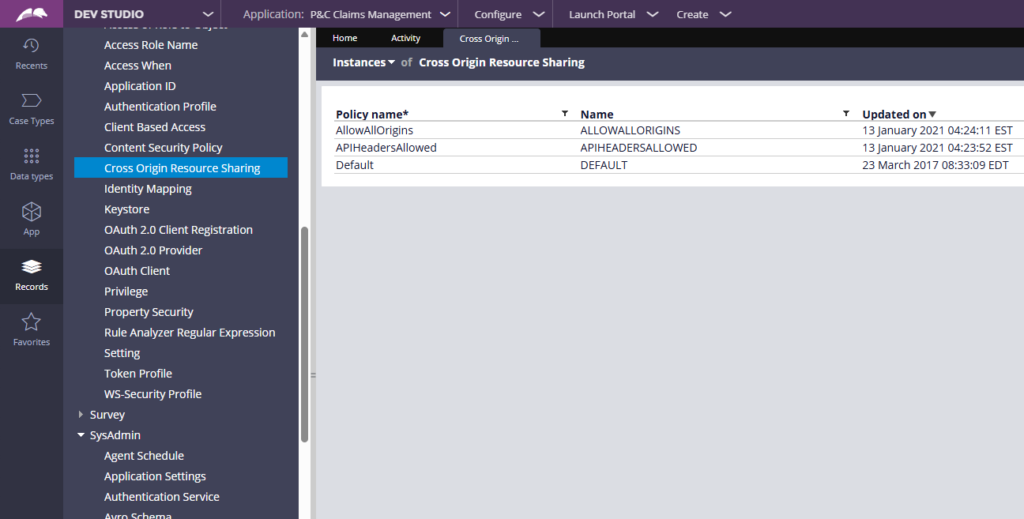
The key configuration blocks are allowed origins, allowed methods, allowed headers, exposed headers, allow credentials and maximum age.
Allowed origins is the most important one. Using a wildcard allows any domain to access the API. Specifying explicit domains restricts access to only those origins. If a request comes from a domain not in the list, the browser blocks it with a 403 error and you will see a CORS error in the console.
Allowed methods controls which HTTP methods are permitted – GET, POST, PUT, DELETE, PATCH. You can restrict to specific methods if needed.
Allowed headers specifies which request headers the browser is permitted to send – typically includes Authorization and Content-Type.
Exposed headers defines which response headers JavaScript code in the consuming application can access. Browsers restrict header access by default even with CORS enabled, so headers you want to read from JavaScript need to be explicitly exposed.
Maximum age sets how long the browser caches the pre-flight result in seconds.
What Pre-Flight Requests Are
When a browser makes a cross-origin API call, it first sends an OPTIONS request to check whether the call is permitted. This is the pre-flight request.
The pre-flight checks the origin, the method and the headers against your CORS configuration. If everything is allowed, the actual API call proceeds. If anything is blocked, the browser stops there and returns a CORS error.
Pre-flight results are cached based on the maximum age setting, which is why you only see pre-flight requests on the first call to each endpoint, not on every subsequent call.
Mapping CORS Policy to Endpoints
Defining a CORS rule is only half the work. You also need to map it to your endpoints.
Go to Configure – Integration – Services – Endpoint CORS Policy Mapping.
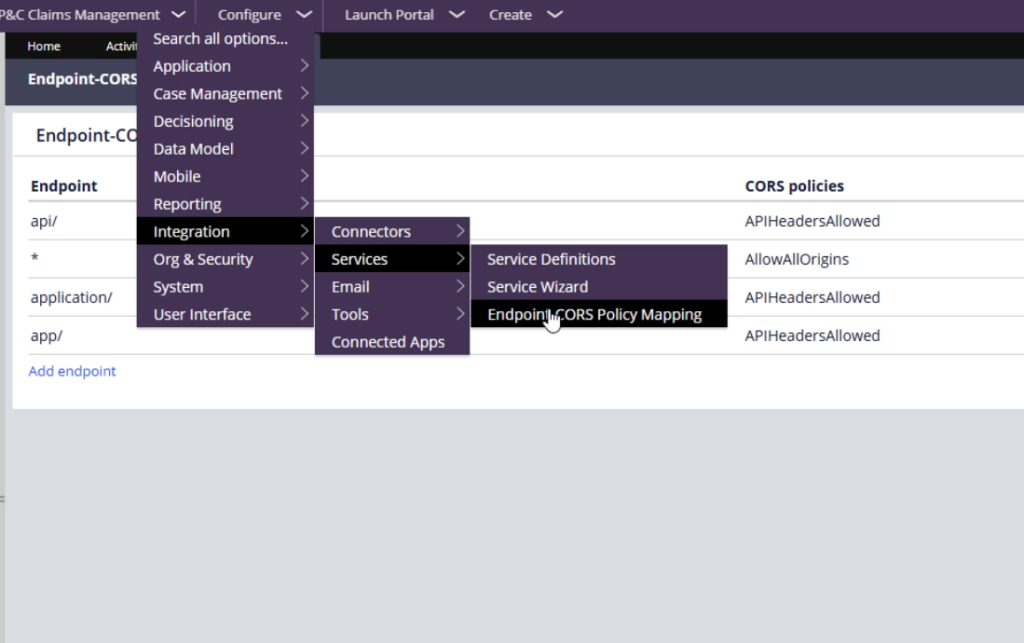
Here you specify which resource paths get which CORS policy. The out-of-the-box setup maps all API endpoints to the API Headers Allowed policy. If you want a more restrictive policy on specific endpoints, you create a new CORS rule and map it to just those paths.
Watch the Full Walkthrough
In the video below I demonstrate live how CORS works – removing an allowed origin, watching the 403 error appear in the browser console, then restoring it and seeing the calls succeed. Includes a full explanation of pre-flight requests and the header blocks.
CORS is one of those topics where seeing it break and then fix is worth more than any amount of reading. This video gives you that.

