


If you work with multiple applications in the same Pega stack, you have probably felt the friction of switching between them.
Log in, switch application, work, switch back. It gets old quickly. Application URL alias, introduced in Pega 8.4, is a clean solution to this problem.
What Application URL Alias Is?
Every Pega application can have its own URL alias – a unique identifier that lets you launch that specific application directly in a browser tab. The URL follows a simple pattern: your Pega server URL, then /app/, then the alias identifier.
When you create a new application, Pega automatically generates an alias for it.
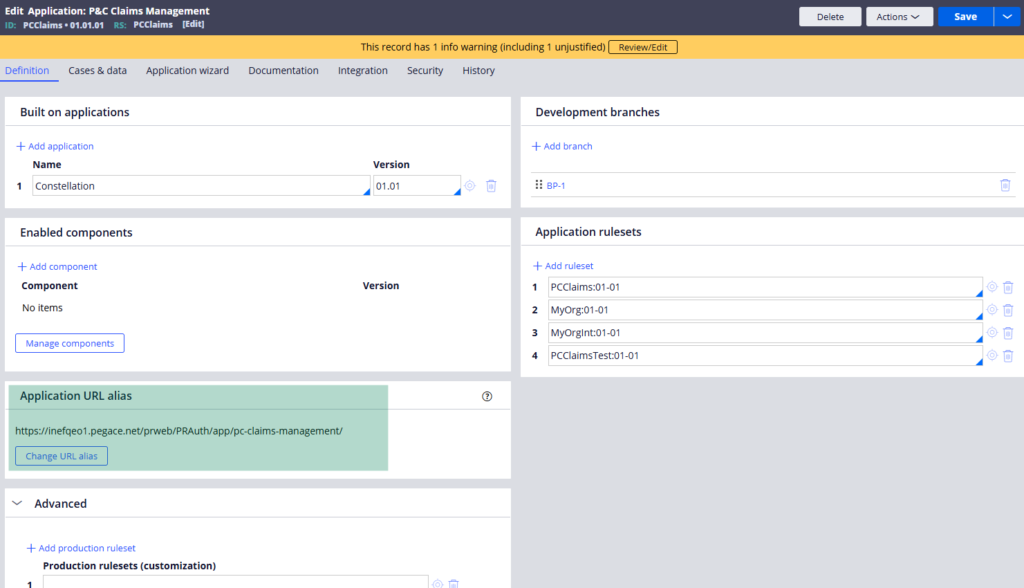
You can see and change this in the application rule form under the application definition section. The auto-generated alias uses an underscore as a separator when Pega creates it by default.
One important thing – if you plan to change the alias, do it before moving to production. Once users and systems start referencing the URL, changing it means updating it everywhere it is referenced.
How It Works in Practice?
Copy the application URL alias from the application rule and open it in a browser. Pega creates a new requester session specifically for that application and prompts you to log in. Once logged in, you are working exclusively inside that application.
The powerful part is that you can do this for multiple applications at the same time – each in its own browser tab. Two applications, two separate requester sessions, running independently in parallel. No switching, no context loss.
For business users who genuinely need to work across multiple applications simultaneously – checking data in one while processing cases in another – this is a significant quality of life improvement.
Watch the Full Walkthrough
In the video below I demonstrate launching two different applications simultaneously using their URL aliases, logging into each independently and working in both at the same time.
Application URL alias is a small feature that makes a real difference in multi-application environments. Worth configuring before your application goes to production.

