


In the previous videos we built service REST rules for both GET and POST. Both worked on the happy path. Neither had any real error handling.
That changes in this video. Here is how error handling works in service REST – and why HTTP status codes are the right tool for it.
HTTP Status Codes Are Your Error Language
In service SOAP, errors are communicated through fault elements. In service REST, you use HTTP status codes. The consumer reads the code and knows what happened.
Pega sets some codes automatically. 200 for success. 401 when authentication fails. 400 for bad requests. 500 for server-side errors. These happen without any configuration on your part.
But you can – and should – go further. You can define your own response conditions, link them to when rules, and return specific HTTP codes for specific scenarios. This gives consumers precise information about what went wrong and how to handle it.
How Response Conditions Work
In the service REST rule, under the method tab, each response has a conditions block. By default there is one condition – the success condition returning 200.
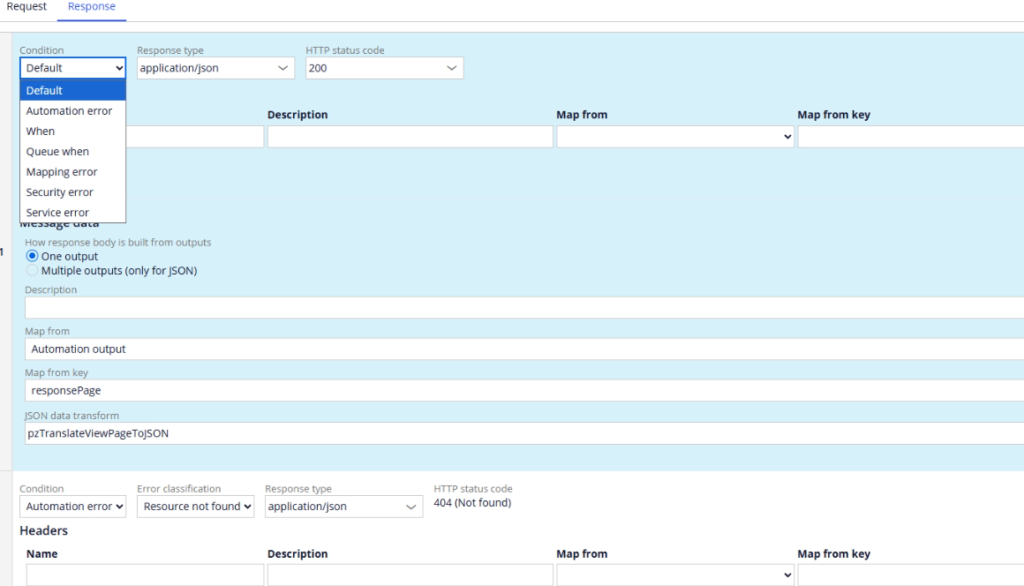
You can add multiple conditions. Each condition has a type – default, when, queueWhen, mapping error, security error, service error. For each condition you set the HTTP status code to return and optionally add response headers or body data.
When rule conditions are the most useful. You create a when rule that evaluates a property – say a status flag set in your service activity – and based on whether it is true or false, you return a different HTTP code.
Detecting Errors in the Service Activity
The activity is where you detect the error. The service REST is where you communicate it.
In the activity, after calling a data page or performing an operation, use the has messages when rule on a jump step. If the step page has messages – which means something went wrong – jump to an error path that sets a status property like py note to “error”. Otherwise continue to the success path.
Back in the service REST, add a response condition using a when rule that checks that status property. When it evaluates to true, return a meaningful HTTP code rather than 200.
For example, if a customer has no fraud records in the system, return 204 no content rather than 200 with an empty body. The consumer immediately knows there is no data rather than having to inspect an empty response.
For a validation error – like an invalid policy number that fails a constraint rule – return 400 bad request. The consumer knows the data they sent was the problem.
Best Practice – Use HTTP Codes, Not Custom Headers
It can be tempting to put error messages in custom response headers. Avoid this. Not all consumers handle custom headers well, and it creates inconsistency across your services.
Stick to HTTP status codes as the primary error communication mechanism. If you need to provide additional detail, put it in the response body using a consistent error structure. The consumer should be able to handle every response purely by reading the status code first.
Watch the Full Walkthrough
In the video below I implement error handling for both the GET and POST service REST rules – detecting errors in the service activity using has messages, setting status properties, creating when rules and configuring response conditions with the right HTTP codes. All tested live in Postman.
Error handling in service REST is straightforward once you understand that HTTP status codes do the communicating. Get that right and your consumers will always know what happened.

