


Disclaimer – This can be applied for traditional non blueprint delivered applications. For blueprint delivered, the steps may vary a bit
Data model design is one of those things that experienced Pega developers do early and do carefully.
Get it right and everything that follows – properties, integrations, reporting, case processing – fits together cleanly. Get it wrong and you spend the rest of the project working around structural decisions that should have been made at the start.
I follow six steps every time. Let me walk you through them.
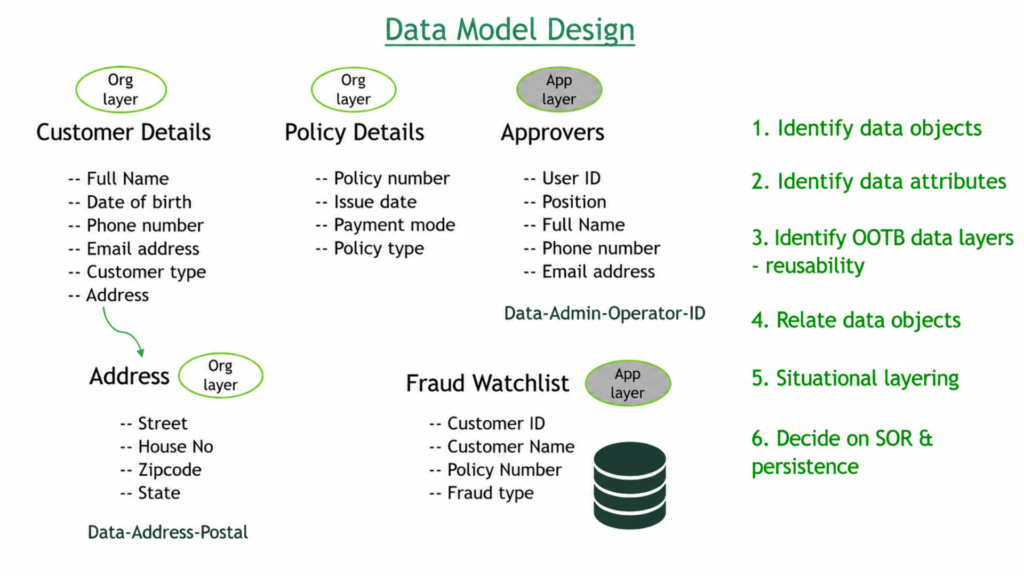
Step 1 – Identify the Data Objects
Start by identifying the main things your application needs to know about. For a claims application the obvious candidates are customer details, policy details, approvers, address and something like a fraud watchlist.
Your business analyst is a good partner here. They understand the domain and can help you identify data objects you might miss from a purely technical perspective.
Step 2 – Define the Attributes
Once you have your data objects, define what each one needs to hold. Customer details might carry full name, date of birth, phone number, email and customer type. Policy details might carry policy number, issue date, payment mode and policy type. Address carries the standard street, house number, zip code, state fields.
Go through each data object and list the attributes it needs. Do not over-engineer it at this stage – start with what you know the application needs.
Step 3 – Identify Out-of-the-Box Data Layers
Before you start creating classes and properties, check what Pega already ships. You will often find that common data objects like address already have a base class – for example Pega ships data-address-postal as a ready-made data type. Building your address class on top of that means you inherit the standard properties automatically without recreating them.
If you are building on an insurance framework or any vertical framework, check what customer and policy data layers are already available. Reuse before you rebuild.
Step 4 – Relate the Data Objects
Data objects rarely exist in isolation. A customer has an address. A case references a customer. A policy belongs to a customer.
Define these relationships explicitly. In Pega terms, if a customer has an address, you create an address page property inside the customer data object that maps to the address data class. When you think through these relationships at design time, the data model becomes much easier to work with during development.
Step 5 – Decide on the Situation Layer
Where should each data object live in your application stack?
Customer details and policy details are likely to be useful across the whole organisation – they belong at the org layer. Approvers are specific to the claims process – they belong at the application layer. Fraud watchlist is claims-specific too – application layer.
Getting this right ensures your inheritance path is clean and your rules are placed where they can be reused at the appropriate level.
Step 6 – Decide on Persistence and System of Record
This is the most important step and directly determines whether a class should be concrete or abstract.
Ask yourself – is Pega the system of record for this data, or is it coming from somewhere else?
Customer details and policy details are sourced from external systems via integration. Pega does not own that data. Those classes should be abstract – they hold data temporarily during processing but do not persist it.
Fraud watchlist is owned by the claims application. Pega creates, reads and updates it. That class should be concrete so instances can be persisted in the database.
This single decision – abstract or concrete – has downstream implications for table creation, integration design and reporting. Make it deliberately, not by accident.
Watch the Full Walkthrough
In the video below I walk through all six steps applied to the claims application – identifying data objects, defining attributes, finding out-of-the-box layers to reuse, relating objects, placing them in the right layer and deciding on persistence for each one.
A well-designed data model is invisible when it works – everything just fits. These six steps give you a structured way to get there before you write a single rule.

