


Here is a simple way to think about single sign-on.
Imagine checking into a hotel. The receptionist verifies your identity at the front desk and hands you an access card. For the rest of your stay – swimming pool, gym, restaurant – you just show that card. Nobody asks to see your passport again.
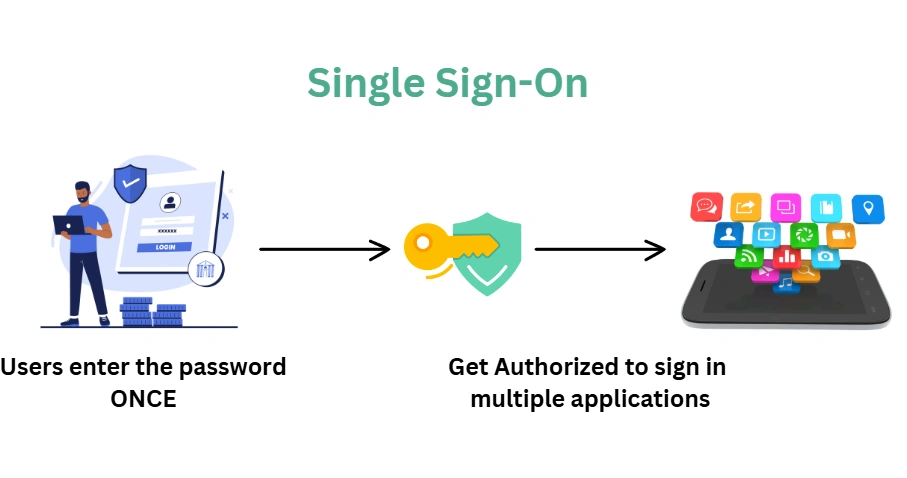
Single sign-on works the same way. You authenticate once against a central identity provider and receive a token. Every application you access after that uses the same token. No separate usernames, no separate passwords, no login screens popping up every time you switch applications.
Why It Matters in Enterprise Pega Projects
If you are building an intranet application – one used by employees inside an organisation – single sign-on is almost always the expected authentication mechanism.
Large organisations have directory services, Active Directory, or identity and access management systems where all employee credentials are stored centrally. Different applications – including Pega – connect to that identity management system to authenticate users. Nobody is logging in separately to each application.
This is also why, for intranet applications, you typically do not need a custom sign up screen. Operators can be provisioned on the fly via SSO when a valid employee logs in for the first time.
OAuth, OpenID and SAML – What Is the Difference
These three names come up constantly in SSO discussions. Here is a simple way to separate them.
OAuth is an authorisation framework. It handles granting one application permission to access resources from another. When you see “sign up with Google” or “log in with Facebook” on a third-party app, that is OAuth in action. You are granting that app permission to use some of your profile data.
OpenID is built on top of OAuth and handles authentication – confirming who you are rather than just what you are allowed to do. When you log into Google and seamlessly navigate to YouTube, Drive and Gmail without re-entering credentials, that is OpenID Connect doing its job.
SAML is an older but widely used standard – especially in enterprise environments. It uses XML-based messaging and is particularly common in corporate SSO setups with Active Directory or similar directory services. This is what you will encounter most often in enterprise Pega implementations.
How the SAML Flow Works
When a user tries to access a Pega application that uses SAML-based SSO, the flow goes roughly like this.
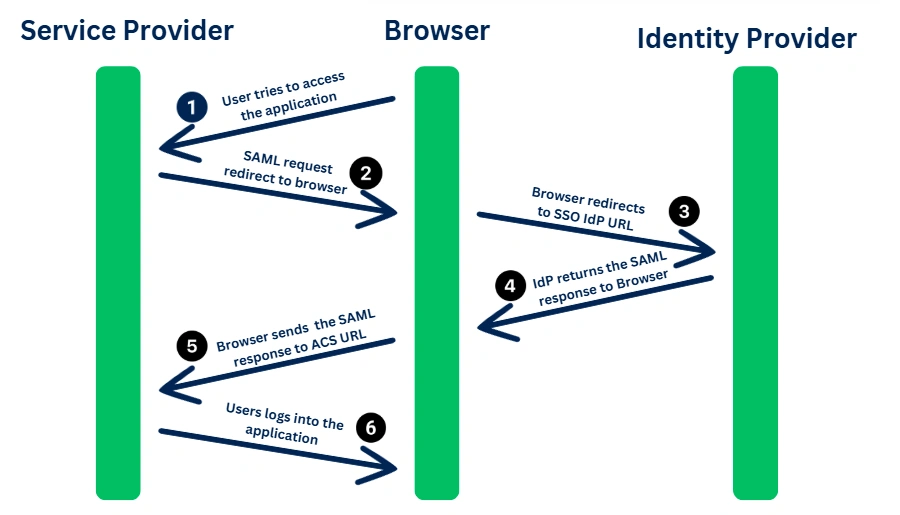
The user launches the application URL. The service provider – in this case Pega – generates a SAML request and redirects the user to the identity provider. The identity provider checks if the user is already authenticated. If they are, it skips the login page entirely and generates an access token. If not, it presents the login page, the user enters their credentials, and then the token is generated.
That token gets sent back to the service provider, which validates it and grants access. From that point, if the user navigates to a second application that uses the same identity provider, the token is already valid. No second login required.
This is the seamless experience that employees in large organisations expect – and that Pega supports out of the box with the right configuration.
Watch the Full Walkthrough
In the video below I walk through the full SSO concept – the hotel analogy, the difference between OAuth, OpenID and SAML, and a step-by-step breakdown of the SAML authentication flow.
Single sign-on is one of those topics that comes up in almost every enterprise Pega project. Understanding the flow and the terminology before you are asked about it in a client conversation makes a real difference.

