


A common question – can you add attachments to a data type in Pega, not just to a case?
The short answer is yes, but with an important constraint. Here is how it works and what you need to know before building it.
The Key Constraint
Technically, Pega’s attachment architecture always links files to a case – not to a data instance. Even when you add an attachment field to a data type, the file gets stored against the case that contains the embedded data object.
This only works when the data type is embedded within a case at some level. A standalone data type accessed outside a case context cannot use attachment fields.
Also worth knowing – the attachment field type for data types is only available in Constellation UI. If you are building a traditional UI application, you cannot add attachment fields to data types. It is Constellation-only.
Setting It Up
The pattern is straightforward once you understand the context requirement.
First, add the attachment field to your data type in the data model. In App Studio, go to the data type, add a new field and select the attachment type.
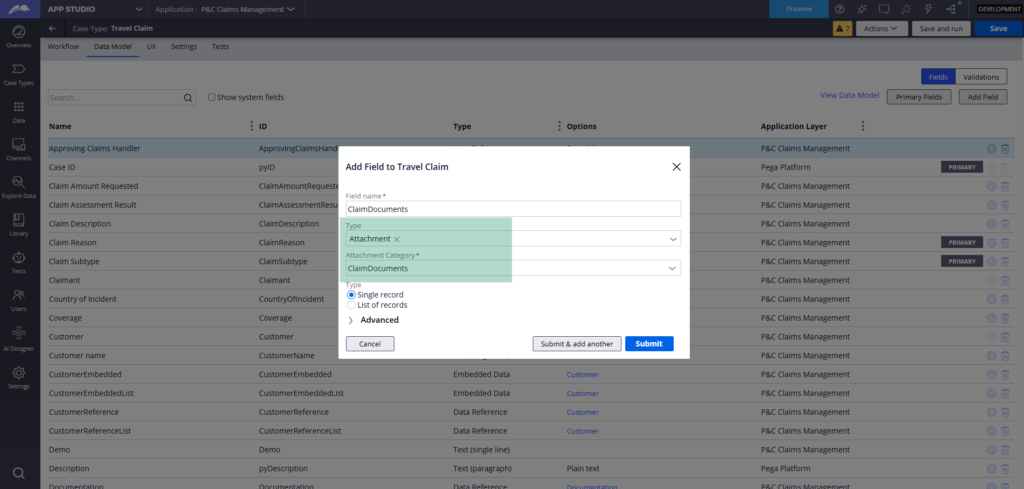
You will need an attachment category for it. Create one if you do not have one already.
Remaining steps and deeper understanding under the hood are explained in the below video.
Watch the Full Walkthrough
In the video below I walk through the full setup in Constellation – adding an attachment field to a passenger data type, embedding it into a flight claim case, configuring the repeating grid and create form, uploading boarding pass documents from within the data context and tracing the attachment creation flow to show exactly how Pega stores the files.
This is one of those capabilities that looks like it should not work – attachments on data types – until you understand that Pega keeps the architecture clean by always linking files to the case. Once you see it in action it makes complete sense.

