
Pega Blueprint: Top 10 Features That Shaped Its Evolution
Looking Back at Blueprint from March 2024 to March 2026
Blueprint has evolved massively over the last two years.
When it first arrived, many of us saw it as an interesting new ideation tool something fresh, AI-powered, and clearly something Pega wanted the ecosystem to notice. At that stage, it felt like one of those products that made you think, “Okay, this is cool… but where is this really going?”
Fast forward to March 2026, and the answer is much clearer.
Blueprint did not remain a lightweight innovation playground. It steadily transformed into a more serious and connected part of the Pega delivery story. It moved from being a standalone design experience into something much closer to a real application delivery accelerator.
I actually spoke about Blueprint back in early 2024 and even created a video around that time.
One of the things I felt almost immediately was that this would never stay isolated for long. Sooner or later, it had to connect with actual application creation inside Pega.
Maybe that prediction was not exactly genius level. Maybe even a dumb fellow could have guessed it. But still it happened, and it happened quickly.
Enjoying this content?
Access the author’s full video courses here at MyKnowAcademy.
Explore Courses →
So in this blog, I do not want to just repeat release notes. Instead, I want to walk through my top 10 Blueprint features introduced from March 2024 to March 2026, and talk about them the way many of us in the Pega community experienced them feature by feature, milestone by milestone.
To learn moe about blueprint, you can visit the below article
Let’s get into it.
1. Create a New Application from Blueprint
March 2024
This was one of the first truly significant shifts in Blueprint’s journey.
When Blueprint initially appeared, it was already good at helping teams ideate. You could define business context, personas, case types, workflows, and data objects. It looked impressive and definitely sparked curiosity. But there was always one practical question underneath all that excitement:
Can this actually help me build a real Pega application?
That question started getting answered in March 2024 when Pega introduced the ability to create a new application from Blueprint.
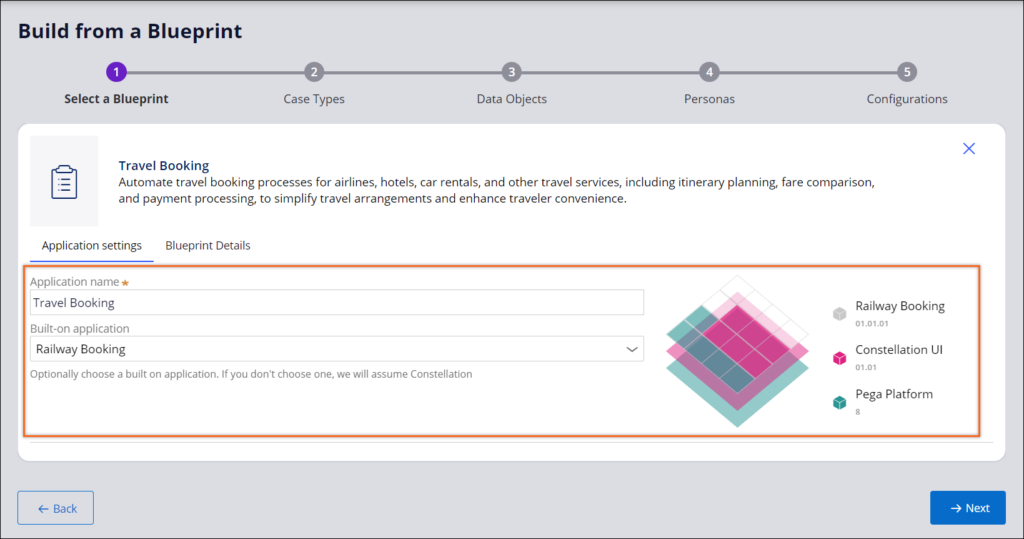
This was the moment Blueprint stopped feeling like just a smart planning tool and started feeling like a real part of the delivery lifecycle. Instead of ending as an isolated artifact, the Blueprint could now act as the starting foundation for application creation in Pega.
Because in enterprise projects, teams do not just want ideas. They want continuity. They want something that starts in business design and travels forward into implementation. For me, this was the first major step in Blueprint becoming much more than an ideation experiment.
2. Case Data Model for Case Types
April 2024
The next enhancement may not have sounded flashy from a marketing perspective, but from a solution design perspective, it was a very important one.
Initially, Blueprint already supported live data and reusable data objects. That was useful, but it still felt incomplete because case types themselves also carry important data, and without defining that properly, the model remains only partially expressed.
That gap started closing in April 2024 with the introduction of case data model support for case types.
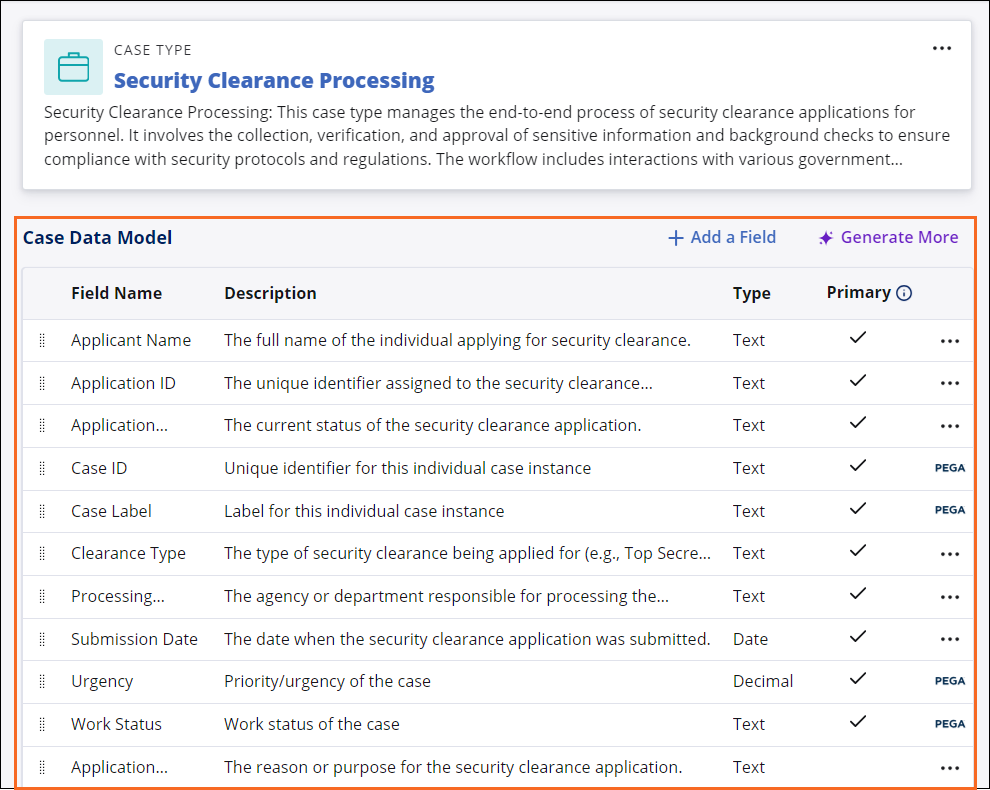
In real delivery, case design and case data cannot be separated too far. A case is not just a journey of stages and steps. It is also a structure of information that needs to be captured, validated, and surfaced. Once Blueprint began supporting this more directly, the design became much more grounded in implementation reality.
This is the kind of feature that may not dominate event keynotes, but architects and LBAs immediately understand its value.
3. Live Preview of the Application
June 2024
Now this is the kind of feature that gets business teams excited very quickly.
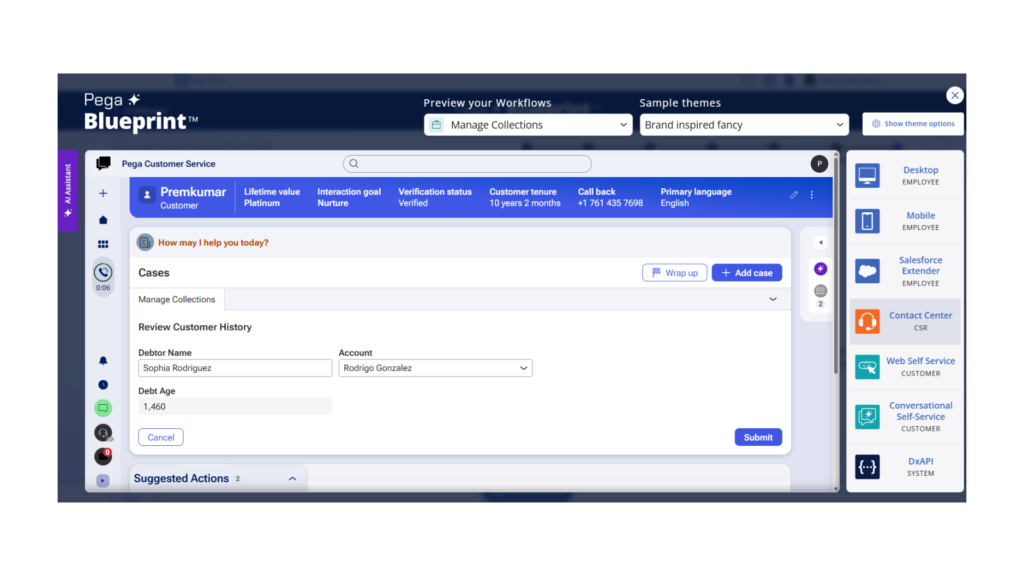
When Pega introduced live preview, Blueprint suddenly became much more visual. It was no longer just about describing an application. It started helping people see it.
That changes stakeholder engagement in a big way.
In early project phases, different people imagine the future application differently. Architects think in layers, business users think in experience, product owners think in scope, and designers think in interaction. A live preview helps align those perspectives much earlier.
The view below is as of today 20th March 2026
4. Language Support Started Expanding
June 2024 onward
Another feature that deserves attention is language support.
This is one of those enhancements that may not create instant buzz, but it becomes increasingly important as enterprise adoption grows. The moment a product starts getting used across regions, business units, and multilingual teams, language support stops being a nice-to-have and starts becoming a practical necessity.
Blueprint gradually expanded in this direction, making the experience more accessible and supporting generated assets in selected languages.
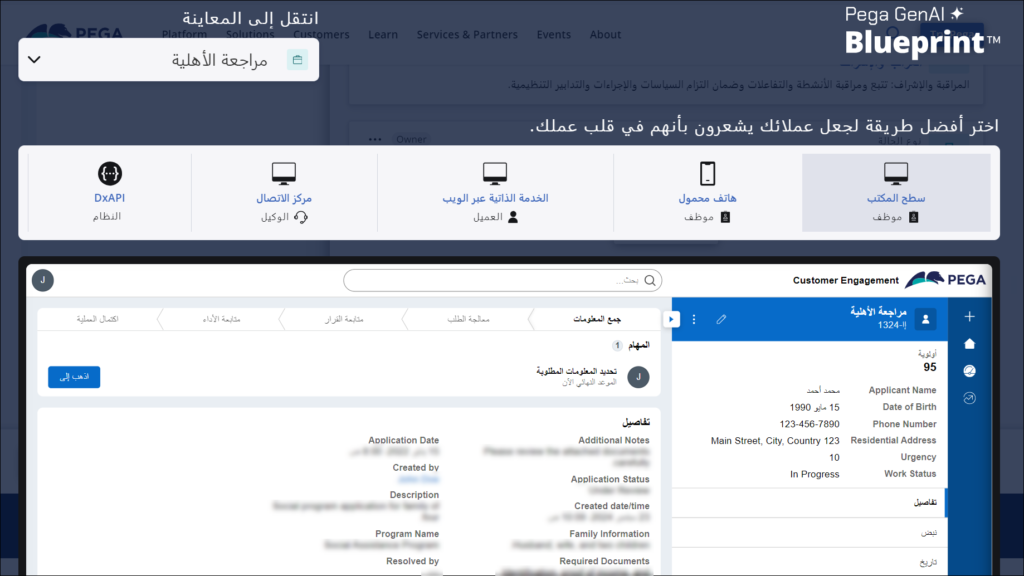
It also showed that Pega was not building Blueprint only for a narrow innovation audience. They were clearly thinking in terms of broader enterprise usability.
5. Data Objects from DDL and OpenAPI
September to October 2024
This was one of the most practical and architecturally meaningful enhancements introduced during the period.
By adding support for using DDL and OpenAPI specifications to define data objects, Blueprint took a very important step toward modernization and integration-heavy delivery.
Because not every project starts with a blank page.
Most organizations already have databases, APIs, schemas, legacy systems, and existing technical definitions that shape the future application. Once structured inputs like DDL and OpenAPI can influence data modeling, Blueprint becomes far more useful in real transformation scenarios.
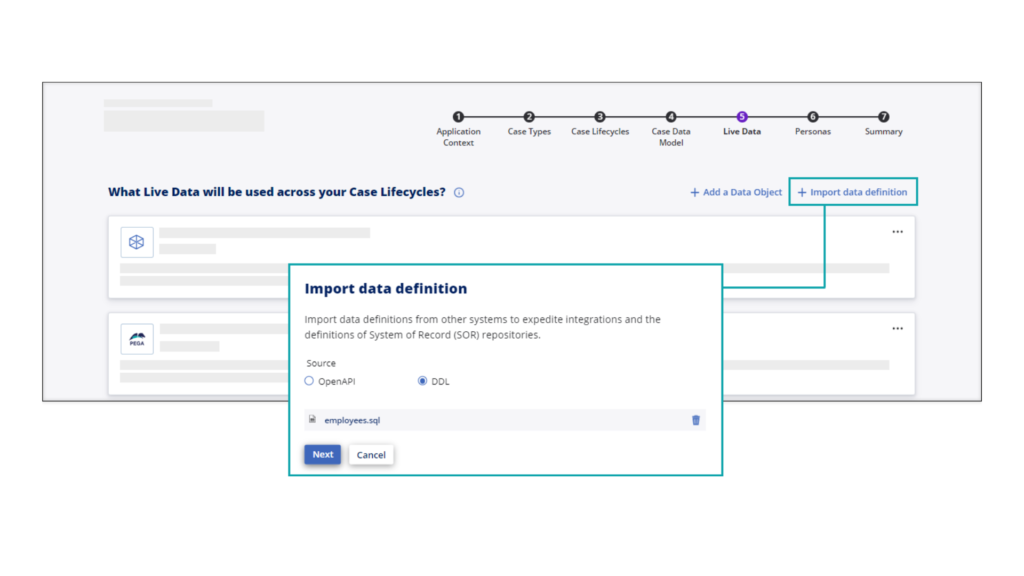
For legacy transformation programs especially, this kind of feature makes Blueprint much more than a conceptual design tool. It becomes a smarter bridge between current-state assets and future-state application design.
6. Customer Service-Specific Blueprinting
January 2025
By early 2025, Pega started shaping Blueprint more intentionally for domain-specific use cases, and Customer Service was one of the clearest examples.
This was an important move because Customer Service applications are not just standard workflows with a different label on top. They have their own expectations around channels, interaction patterns, case handling, and service experiences.
As you can see in the below picture you can enable the customer service specific features in the blueprint stage as well.
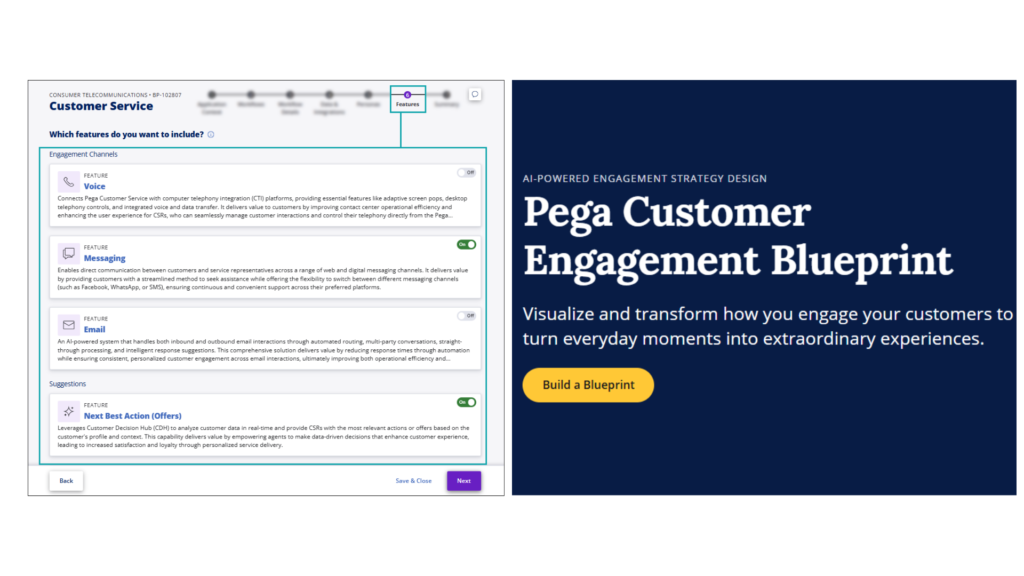
Worth mentioning – Pega also introduced the Pega Customer Engagement Blueprint in early 2025 to build CDH specific blueprints.
7. Stronger Support for Supporting Documents and Legacy Inputs
March 2025 onward
This was another feature area that significantly increased Blueprint’s practical value.
One of the easiest mistakes people make is to think Blueprint works best only when the team starts with a fresh whiteboard and a clean set of ideas. But that is rarely how enterprise transformation really begins.
Most organizations come with real project baggage: process documents, PDFs, screenshots, diagrams, specifications, API definitions, and existing workflows. Blueprint gradually became better at accepting and using supporting documents in different formats, and that made a huge difference.
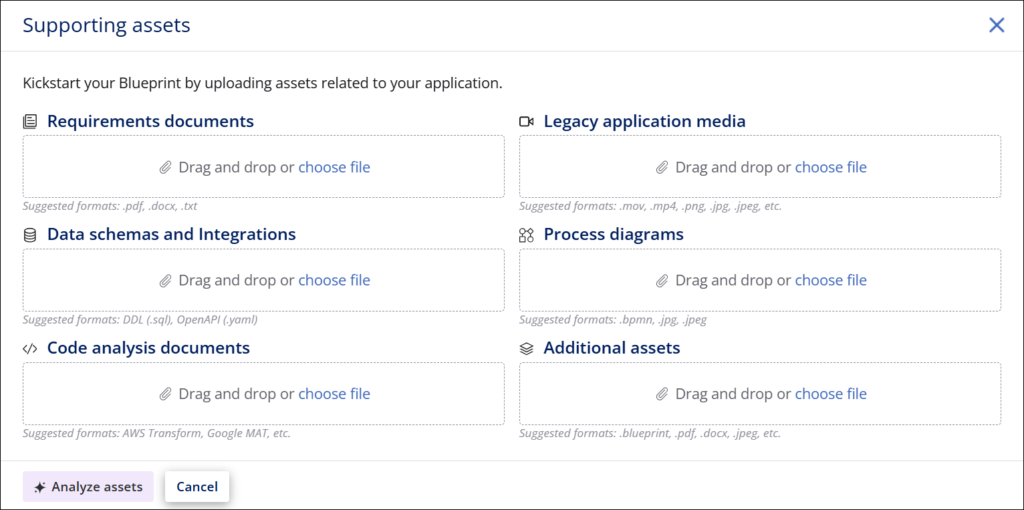
Because now the conversation is no longer only, “Tell me what application you want to build.” It becomes, “Show me what you already have, and let’s use that as part of the design journey.”
That is exactly the kind of capability that makes Blueprint useful not only for innovation, but also for modernization.
8. Region-Specific Blueprinting and Data Residency
June 2025
This is one of those features that may not look exciting on a demo slide, but it matters a lot once real enterprise adoption begins.
When Pega introduced support for region-specific Blueprinting and data residency, it was addressing a very serious adoption concern. Enterprises, especially those operating across regulated industries and geographies, care deeply about where their information is stored and how compliance expectations are handled.
And this is important because teams may feed in actual business context, documents, workflows, and transformation inputs. Once that starts happening, governance and trust become critical.
So regional support was not just an infrastructure enhancement. It was also a confidence enhancement.
9. More Mature File Storage and Asset Handling
October 2025
As Blueprint evolved further, file handling and supporting document storage also became more central to the overall story.
This may sound like a back-end topic, but in practice it connects directly to how confidently teams can use the product. The more Blueprint relies on supporting assets, imported files, generated design content, and reusable artifacts, the more important secure and mature file management becomes.
For Pega Cloud customers they store these assets in their own S3 buckets whereas for non-pega cloud customers, the documents get saved into the Pega AWS secured S3 buckets.
10. Vibe Coding in Blueprint
March 2026
And finally, we come to the newest and perhaps the most naturally headline-grabbing feature in this two-year journey: vibe coding.
By March 2026, Blueprint had moved even further into a conversational design experience, allowing users to shape workflows, data, and application ideas more fluidly using natural language interactions.
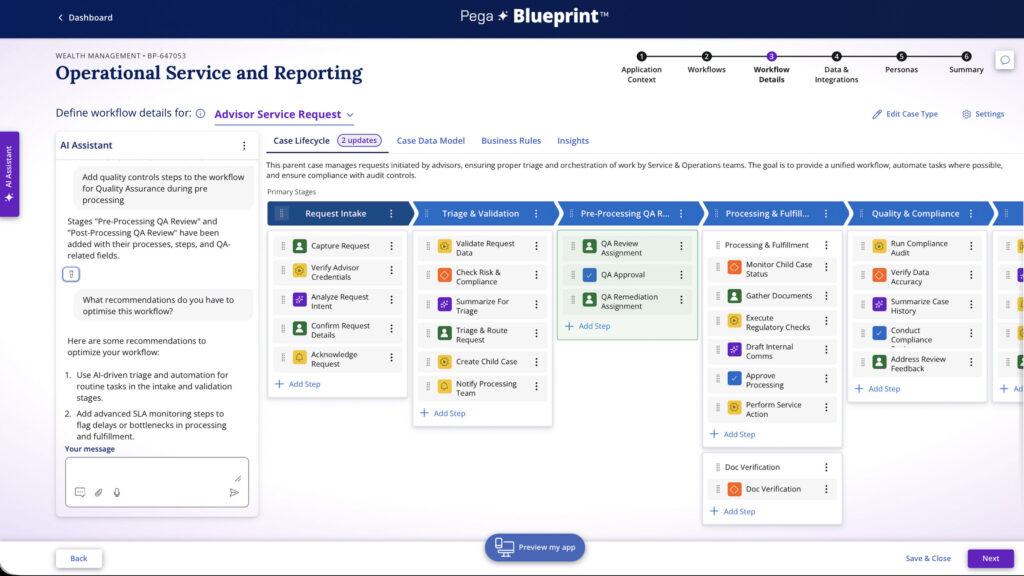
This feels like a fitting milestone for where Blueprint has been heading all along.
If you step back and look at the full timeline, Blueprint has consistently been reducing friction between idea and design, between design and structure, and between structure and implementation. Vibe coding is another step in that same direction making the process more accessible, fluid, and collaborative.
More about Vibe coding can be found here
And importantly, it opens the door wider for business participation.
Two More Modernization Tools Worth Mentioning
Before I close, I also want to mention two related tools from Pega that nicely strengthen the overall Blueprint modernization story.
The first is the Pega Application Signature Tool. This is especially useful for heritage Pega application modernization. Instead of manually spending months understanding an old application, the tool extracts key metadata into a standardized .pegasign file, which can then be imported into Blueprint. From there, teams can visualize the current application, reimagine it with AI-assisted design, and move toward generating a modern Constellation-based application. That makes it a very practical accelerator for Pega modernization efforts. More details can be found here
The second is Notes to Blueprint, which is really Pega’s answer to legacy Lotus Notes transformation. Pega positions it as a low-risk path off Lotus Notes and into Blueprint-driven modernization. For organizations still carrying heavy Lotus Notes baggage, this is one of the clearest examples of Blueprint being used as a serious modernization engine rather than just an ideation tool. More details can be found here.
Final Thoughts
Looking back at Blueprint from March 2024 to March 2026, what stands out to me is not just the number of features introduced. It is the direction of travel.
Blueprint did not evolve randomly.
It moved with a pattern.
It started by becoming more connected to real application creation. Then it became stronger in data modeling. Then more visual. Then more enterprise-friendly. Then better at modernization input. Then more solution-aware. Then more region-aware. Then more operationally mature. And now, more conversational.
That is a very meaningful progression.
Over the last two years, Pega has steadily shaped Blueprint into something much more serious — a collaborative, enterprise-focused design accelerator that is increasingly tied to how applications can actually be defined and delivered.
These are my top 10 features from that journey.
Of course, Blueprint has had many more enhancements beyond this list. But if you want to understand the bigger story of its evolution, I think these ten milestones tell it very well.
