
Different Ways to Create Cases in Pega at Runtime
We often hear that Pega provides an omnichannel experience and follows a center-out architecture. These are not just marketing terms. They directly connect to one of Pega’s biggest strengths – case management.
Before getting into the core topic of this article, it is worth spending a moment on those two concepts, because they explain why Pega case creation is so flexible in the first place.
The Omni-Channel Centering Out!
At its core, Pega is all about case lifecycle management. Almost any business process can be translated into a case type with stages, steps, decisions, SLAs, and automation.
Today, with Blueprint becoming a key part of the design journey, defining case types is becoming even more business-friendly. But the real power of Pega is not only in designing a case. It is in the number of ways that same case can be created and managed across channels.
That is where omnichannel and center-out come into the picture.
Omnichannel and center-out, in simple terms
When Pega talks about omnichannel, it basically means this:
The same business process and the same case lifecycle can be exposed consistently across different channels.
That could be:
- a user portal
- a mobile app
- a web application
- an email-driven interaction
- an external system
- an API consumer
Enjoying this content?
Access the author’s full video courses here at MyKnowAcademy.
Explore Courses →
In many traditional top-down architectures, the business logic gets tightly coupled with the presentation layer. So when a company wants the same process in another channel, they often end up rebuilding the logic again for web, mobile, or another interface.
Pega’s center-out approach is different.
You build the business logic once at the center, usually through case types, data models, flows, decisions, and rules. Then you expose or orchestrate that logic through different channels. That is exactly why case creation is such a good example to discuss, because the same case can be created from multiple entry points without reinventing the business process every time.
So let us get into the real topic:
What are the different ways to create a case in Pega at runtime?
To keep this article practical, I am focusing on runtime case creation, in other words, how end users, front-end applications, or external systems can create cases in production.
Let us assume a simple example.
Say you are building an Airline Customer Service application and one of the case types is Flight Booking. The case type is already designed and available in the application.
Now the question becomes:
How can that Flight Booking case be created at runtime?
1. Create cases from the Pega user portal
This is the most common and straightforward approach.
For this section, let us stay with Traditional UI portals and leave Constellation aside for a moment. In a standard low-code Pega application, the user portal usually provides a Create action or navigation option that allows users to create new cases directly.
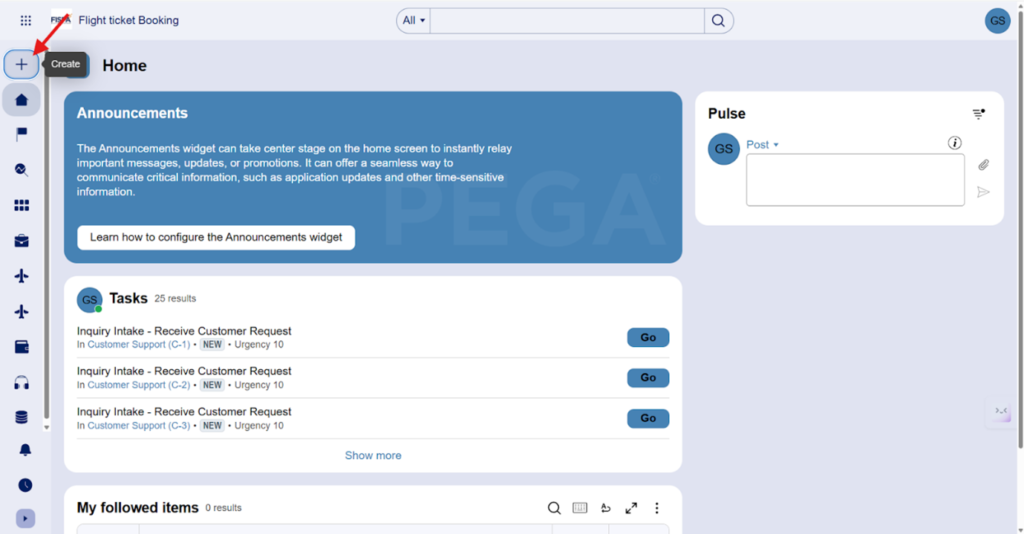
The list of case types shown there depends on the application configuration and whether the case type is enabled for creation from the portal. Once configured, business users can simply click and launch a new case.
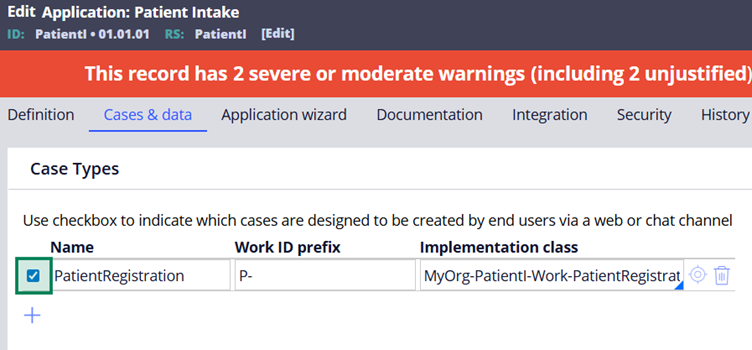
From a developer point of view, this may look simple on the surface, but underneath Pega is already orchestrating its standard utilities for work creation.
I do not want to go too deep into internals in this article, but this is where utilities such as:
CreateWorkPageAddWork
and other supporting OOTB activities come into the picture.
Those internals deserve a separate article on their own.
For now, the key point is this:
When a user creates a case from the Pega portal, Pega already has the out-of-the-box orchestration in place to handle that creation flow.
In Traditional UI, action sets also play a role in triggering those actions, which makes portal-based creation very natural and low code.
As of today, this is the pattern you will see in most Pega implementations.
2. Create cases using DX API
Now let us move beyond the native Pega portal.
What if the case needs to be created from a React application, an Angular front end, or from a Pega Constellation UI Design system portal?
This is where DX APIs come in.
Pega provides two API styles in this space:
- Traditional DX APIs
- Constellation DX APIs
Both can support case creation, but they differ significantly in how they are intended to be used.
Traditional DX APIs
Traditional DX APIs are useful when you want a more direct API interaction without UI-heavy metadata. They can be used to create cases and interact with Pega from other systems.
Constellation DX APIs
Constellation DX APIs go a step further.
They do not just return the basic case creation response. They also return UI metadata that helps the front end understand how to render views, fields, and interactions.
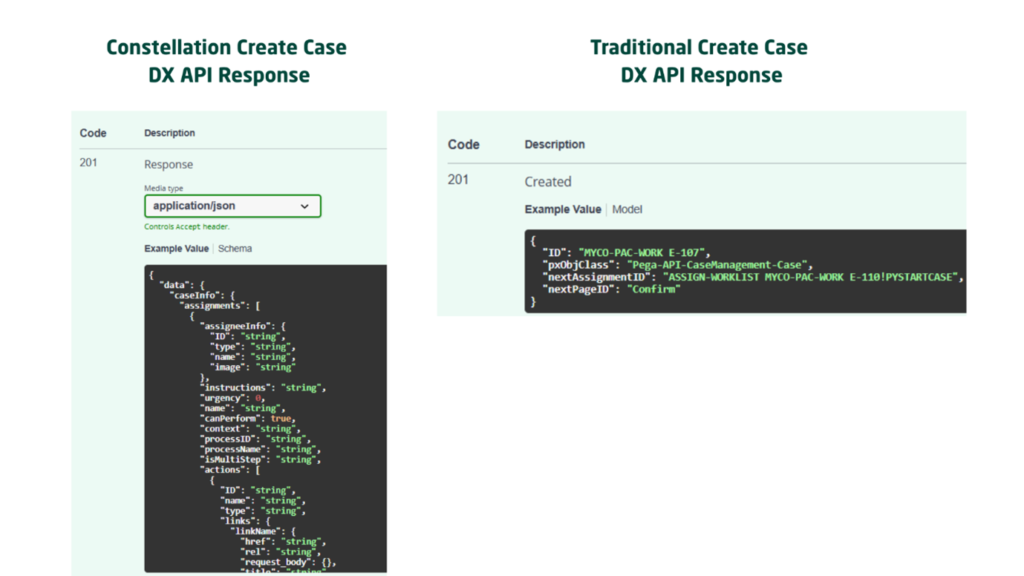
In other words, the front end becomes more of a rendering layer, while Pega still controls a lot of the UI behavior definition.
That is a major design shift.
With Constellation, the front end is decoupled, but the experience is still heavily driven by metadata coming from Pega. So if you are building experiences outside the standard portal, DX APIs become one of the main ways to create and interact with cases.
This is worth understanding clearly:
If you want to create a case from an external UI, Pega already gives you OOTB API options. You do not always need to invent your own service layer from scratch.
That said, real projects are rarely limited to standard UI-driven scenarios.
There are many cases where case creation needs to happen based on:
- Kafka events
- MQ messages
- file drops
- email listeners
- conditional integration logic
- external business events
And that leads us to the next category.
But wait, it is also worth talking about the embed and mashups!
What about Web Embed and Mashup?
This sits somewhere on a similar line.
- In a traditional UI Mashup, Pega UI can be embedded into external websites, and case creation can still be driven using Pega utilities and action sets.
- In Constellation Web Embed, the interaction typically relies on Constellation DX APIs behind the scenes.
So even in embedded experiences, you are still fundamentally leveraging Pega’s case creation architecture.
3. Create cases from external services
This is where things become even more interesting from an integration architect’s perspective.
Sometimes the case is not created by a user clicking a button at all. Instead, a backend system or an incoming service request creates the case.
Pega supports multiple service types for this, including: REST, SOAP, Email, File, JMS, MQ, real-time integrations
The exact solution depends on the channel and protocol, but the design principle remains consistent:
The orchestration layer may differ, but the core case creation logic still relies on standard Pega work creation capabilities.
SvcAddWorkObject
For service-driven case creation, one important utility to know is:
SvcAddWorkObject
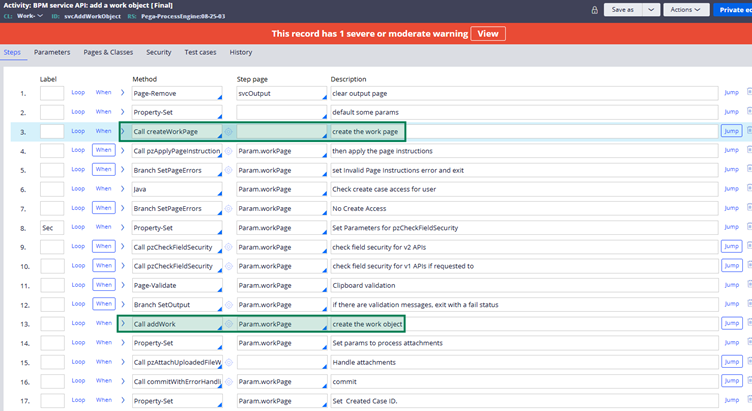
This is a standard OOTB utility specifically associated with creating work objects through services. When the service request is parsed and mapped correctly, this utility can take that data, merge it into the primary page context, and create the case.
In real implementations, you will often not call it blindly.
Instead, you may wrap the logic in your own activity or orchestration layer to:
- validate the input
- apply conditional checks
- enrich data
- avoid duplicate creation
- return a custom response
- trigger additional post-processing
That wrapper layer is often where the project-specific design happens.
But again, the point is not that every channel has a completely different case engine.
The point is the opposite:
Pega gives you multiple orchestration options, but the heart of case creation still stays within the same platform rulebase.
The Practical View
This is where I think many Pega developers miss the bigger picture.
They learn how to create a case from the portal and stop there. But in real enterprise architecture, case creation is not a UI feature. It is a business capability that can be triggered from many channels.
That is exactly why understanding this topic matters.
If you think in a center-out way, you stop asking:
“How do I create a case from this screen?”
and you start asking:
“What is the best channel or orchestration layer to trigger this business process?”
That is a much stronger architecture mindset.
Final Thoughts
To summarize, Pega cases can be created at runtime through multiple paths:
- directly from the Pega user portal
- through Traditional DX APIs
- through Constellation DX APIs
- via Web Embed or Mashup
- through external services and integration channels
The entry point may change, but the strength of the platform is that the core business logic remains reusable.
That is the real meaning of center-out architecture in action.
And case creation is just one example.
Once you start seeing Pega this way, you also start appreciating why the platform fits so well in enterprise ecosystems where the same business capability needs to be exposed across multiple channels without rebuilding everything again.
